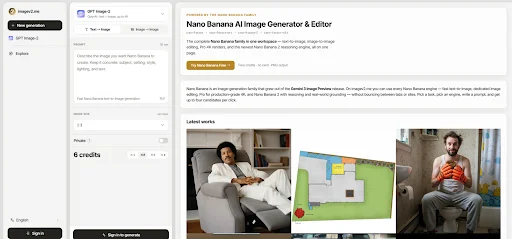
The biggest shift in AI image tools is not only better image quality. It is the growing need for a workflow that matches real production habits. A user may begin with a loose visual idea in the morning, test three campaign directions by lunch, refine a product scene in the afternoon, and prepare a vertical social image before the day ends. A single “generate image” button can feel too thin for that kind of work. That is where Nano Banana AI Image Generator becomes interesting: it sits inside a broader ImageV2 AI studio where users can choose different models and generation modes according to the task.
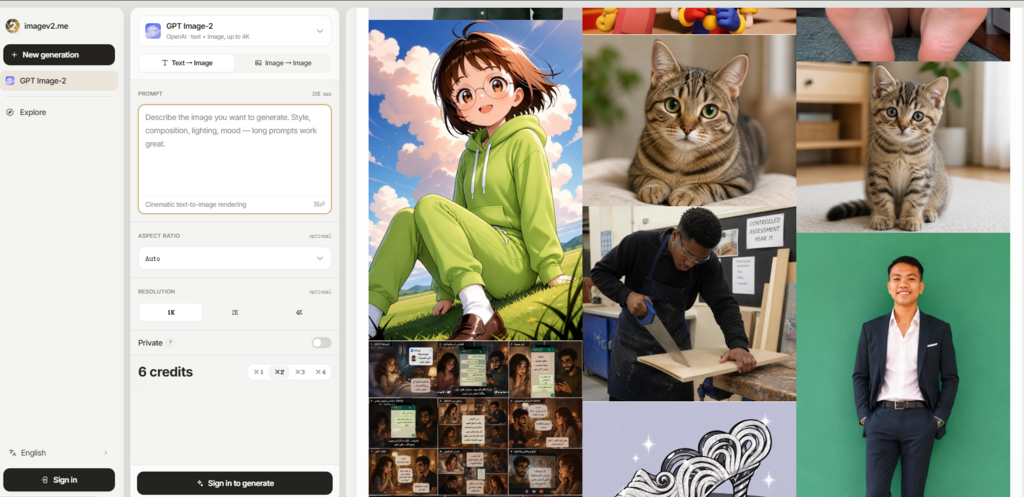
Instead of framing the platform as a miracle tool, I approached it as a working environment. The real question was whether it helps turn unclear ideas into more usable image directions. The official page presents a flow that includes model selection, text-to-image generation, image-to-image editing, prompt input, reference image upload, aspect ratio choice, resolution settings, private generation, and credit-based use. Those are the practical elements that matter when the goal is not just making an image, but making an image that fits a purpose.
The best way to understand ImageV2 AI is to separate three stages: exploration, control, and review. Exploration is where fast models help users test ideas. Control is where prompts, references, ratios, and resolution settings shape the output. Review is where users decide whether the image is ready, needs another prompt, or should be moved to a different model. This article uses that structure rather than a generic feature list.
The Real Problem Is Creative Uncertainty
Most AI image users do not start with perfect prompts. They start with uncertainty. A marketer may know the campaign should feel premium but not know the exact visual language. A creator may know the character mood but not the background. A designer may know the layout format but not the best image style. A small business owner may know the product needs a stronger visual story but not how to describe it.
ImageV2 AI is useful because it gives uncertainty a process. The platform does not require the user to solve everything in one sentence. It lets them choose a model, decide whether they are starting from text or an image, and define format settings before generating.
A Useful Tool Should Support Iteration
The strongest AI image workflows are not one-shot workflows. They help users move from rough direction to clearer output. In my testing perspective, ImageV2 AI feels designed for that kind of iteration. The page’s model options suggest that a user can start with faster exploration, then move toward more polished or task-specific generation when the idea becomes clearer.
This is especially valuable for people who create visual content regularly. Repetition teaches what each model is better suited for. Over time, the user develops judgment instead of treating every prompt as a gamble.
The First Image Is Usually A Draft
A realistic expectation is important. The first generation may be useful, but it should be treated as a draft. The platform can help users test direction, but prompt clarity, reference quality, and task complexity still affect the result. Complex scenes, exact text, or precise visual consistency may require more than one attempt.
How ImageV2 AI Moves From Idea To Output
The official usage flow is not complicated, and that is part of the appeal. It avoids turning image generation into a technical setup process. The core steps are model choice, input choice, output setup, and generation.
Step One Match The Model To The Goal
The first step is choosing the model. ImageV2 AI presents several options, including GPT Image 2, Nano Banana, Nano Banana 2, and Nano Banana Pro. The official descriptions separate them by practical use cases, such as fast experimentation, text-aware commercial visuals, image editing, higher quality output, and 4K-oriented generation.
The Goal Should Decide The Model
Users should not choose a model only because it sounds new. A fast concept sketch, a product ad, a text-heavy poster, and an edited reference image have different requirements. Matching the model to the job reduces wasted generations and makes the review process easier.
Step Two Choose Text Or Image Based Creation
The second step is deciding whether to generate from text or work from a reference image. Text-to-image is useful when the user is building a scene from scratch. Image-to-image is more useful when the user already has a starting image and wants a controlled change.
Image Input Makes Editing More Concrete
Reference images can make creative direction easier to communicate. A user can show the base subject, style, layout, or composition instead of trying to describe every visual element. The limitation is that reference input does not remove the need for clear instructions. The user still needs to explain what should change and what should remain stable.
Step Three Select Ratio Resolution And Privacy
The third step is setting the output format. The page shows multiple aspect ratio options, including common vertical, square, horizontal, and wide formats. It also includes 1K, 2K, and 4K resolution choices, along with a private generation option.
Format Choices Prevent Late Stage Friction
Choosing the ratio before generation helps avoid awkward cropping later. A vertical social post, a square avatar image, and a wide landing page banner require different compositions. Privacy also matters for draft work, especially when users are testing business ideas or unpublished campaigns.
Three Testing Stages For Better Results
The most effective way to use ImageV2 AI is not to ask for perfection immediately. A stronger workflow is to divide the process into exploration, refinement, and production review. Each stage has a different purpose.
Exploration Stage For Fast Visual Discovery
The exploration stage is where users test rough directions. Nano Banana appears well suited to this stage because the official page positions it around fast and lower-cost experimentation. This makes sense for users comparing multiple moods, compositions, or scene concepts.
The main difficulty in this stage is not visual beauty. It is direction. Does the image suggest the right mood? Is the subject placement close enough? Does the color palette feel useful? Is the idea worth refining? At this stage, a slightly imperfect image can still be valuable if it helps the user choose a direction.
Refinement Stage For Structure And Detail
Once the idea becomes clearer, users may need stronger structure. This is where the officially positioned strengths of GPT Image 2 AI Image Generator become more relevant. The page connects GPT Image 2 with text rendering, commercial images, UI designs, product images, infographics, and image editing.
From a practical testing view, that makes it a more natural choice when the image needs to communicate information, not just look appealing. A poster needs readable hierarchy. A UI mockup needs a controlled layout. A product visual needs a believable scene. An infographic needs structure. Results may still vary, but the model positioning gives users a clearer reason to switch from pure exploration to more deliberate creation.
Review Stage For Usability And Risk
The review stage is where the user checks whether the output is usable. This is often overlooked in AI image workflows. A result can look impressive at first glance but still fail a real task. Text may be slightly wrong. A hand may look strange. A product may not appear stable. A layout may not leave enough space for copy. A style may not match the brand.
ImageV2 AI gives users enough setup control to reduce some of these issues, but it cannot remove final review. The user should still inspect details before using an image in public-facing work.
Comparing Workflow Value Across User Types
A good comparison should focus on how the platform fits different users, not only on technical labels. ImageV2 AI’s multi-model structure is most useful when the user has changing image needs.
| User Type | Main Need | ImageV2 AI Fit |
| Content creator | Fast visual concepts and style tests | Strong fit for iterative exploration |
| Marketer | Campaign visuals and readable layouts | Useful when model choice matters |
| Designer | Ratios, references, and layout direction | Helpful for structured drafting |
| Ecommerce user | Product scene ideas and visual testing | Useful for early concept work |
| Casual user | One simple image request | Useful, but may feel more advanced |
| Small team | Flexible image workflow in one place | Strong fit for repeated production |
Where The Product Feels Different
The difference is not only that ImageV2 AI has multiple models. The difference is that the models are placed inside a practical creation flow. A user can start from text or image, select a model for the task, choose a shape, choose resolution, and use privacy when needed. These controls are simple, but they make the workflow feel more deliberate.
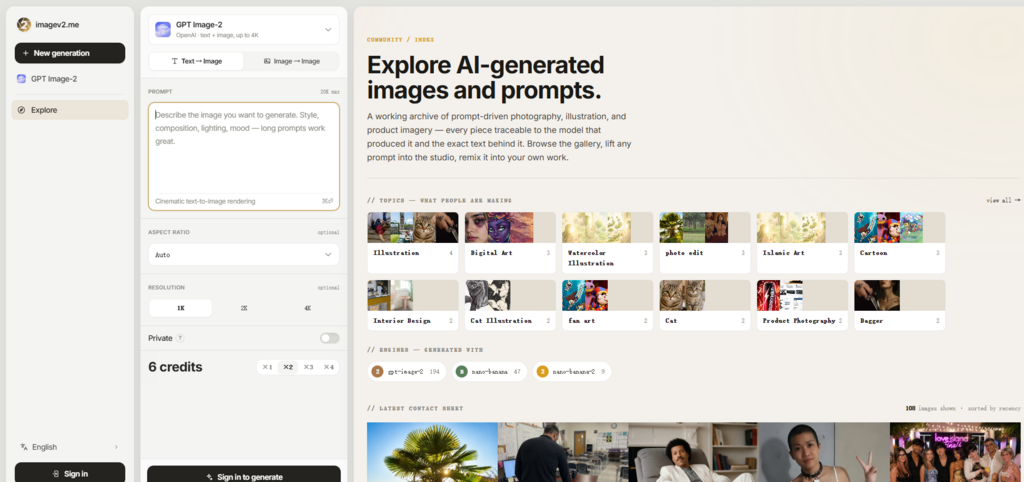
This matters for people who have moved beyond curiosity. After the first few AI images, most users begin asking harder questions. Can I make the image fit a campaign size? Can I edit from a reference? Can I test a cheaper or faster route first? Can I use a more suitable model for text? Can I keep private drafts out of public view?
ImageV2 AI’s official page answers these questions through workflow design rather than long explanations.
The Strongest Value Is Organized Testing
The platform is strongest when used as an organized testing space. Users can compare model behavior, refine prompt language, and learn which route works best for each task. This is more useful than treating every failed output as random. When a result is not right, the user can adjust the prompt, change the model, alter the reference, or modify the ratio.
That sense of organized revision is the product’s real advantage.
Limitations That Users Should Expect
There are still limitations. Prompt quality has a major effect on the final image. Image-to-image results may not preserve every detail exactly. Complex visual requests can require multiple generations. Text inside images should be checked carefully before use. Higher resolution and image editing may consume more credits, so users should confirm details inside the studio before relying on the platform for batch work.
Another limitation is that more choice requires more judgment. A beginner may initially wonder which model to choose. The official descriptions help, but the best understanding comes from testing. This is why ImageV2 AI is better for users willing to learn a workflow, not only users expecting a perfect single-click result.
The platform also should not be treated as a replacement for human taste. It can generate, edit, and help explore, but the user still needs to judge composition, realism, brand fit, readability, and whether the image matches the original goal.
Why This Workflow Feels Timely Now
AI image generation is becoming more specialized. The old question was “can AI make an image?” The better question now is “which model and workflow should I use for this specific image?” ImageV2 AI feels timely because it reflects that shift. It does not pretend every task is the same.
For fast sketches, users can explore quickly. For commercial or text-aware work, they can move toward a more suitable model. For reference-based edits, they can upload images and describe changes. For platform-specific output, they can set aspect ratio and resolution before generating. For private drafts, they can use the privacy option described on the page.
That combination makes ImageV2 AI useful for creators who think in workflows rather than isolated prompts. It will not make every image perfect. It will not remove the need for revision. But it does give users a clearer path from rough idea to usable visual direction, and in practical creative work, that clarity is often what saves the most time.
See how this strategy completes your current workflow at 2A Magazine.