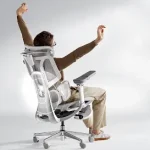

Black Friday is a tempting time to replace an uncomfortable desk chair. Prices drop, product descriptions promise better posture, and suddenly every chair seems to offer the perfect ergonomic solution. But if you regularly finish your workday with an aching back, choosing the right chair takes more than finding the biggest discount.
A good office chair for back pain should support your body, fit your proportions, and allow you to change positions comfortably throughout the day. Features such as lumbar adjustment, seat depth, and armrest positioning can make a noticeable difference in how a chair feels after several hours.
The challenge is knowing which features genuinely matter and which are simply marketing extras.
Before adding a discounted chair to your Black Friday shopping cart, check these seven features to make sure you’re investing in comfort rather than another expensive disappointment.
1. Adjustable Lumbar Support That Fits Your Lower Back
Your lower back has a natural inward curve. When a chair fails to support that area comfortably, you may find yourself slouching or constantly shifting to relieve pressure.
That’s why lumbar support deserves attention when comparing ergonomic chairs.
An adjustable lumbar support chair lets you change the position of the back support to suit your body. Some designs offer vertical adjustment, while others allow you to control how far the support extends.
Look for these features:
- Height adjustment to align the support with your lower back
- Adjustable support depth or firmness
- A backrest that follows your natural spinal curve
- Comfortable support without excessive pressure
Imagine sitting down in a chair with a fixed lumbar cushion that presses against the wrong part of your back. Even expensive padding won’t solve that problem.
For a clearer explanation of how lumbar support works, explore HBADA’s guide to lumbar support.
The goal isn’t to force your spine into a rigid position. It’s to provide comfortable support while allowing natural movement.
2. Adjustable Seat Depth for Proper Leg Support
Seat depth is one of those measurements shoppers often overlook until their new chair arrives.
The office chair seat depth determines how much of your thighs the seat supports and how comfortably your back can rest against the backrest.
A seat that’s too deep may press against the backs of your knees. A seat that’s too shallow may leave your thighs inadequately supported.
A practical fit test is to sit with your back against the backrest and check for a small gap between the seat edge and the backs of your knees. Around two to three finger widths is a useful starting point.
When comparing Black Friday offers, look for a sliding seat mechanism that lets you adjust this distance.
This feature is especially valuable if you’re taller, shorter, or sharing the chair with another person.
Remember that a chair’s advertised dimensions don’t tell the whole story. The adjustment range matters just as much as the overall size.
3. Seat Height Adjustment That Matches Your Desk
Have you ever used a chair that forced you to raise your shoulders while typing? Or one that left your feet dangling above the floor?
Both situations can make long work sessions uncomfortable.
A suitable chair should allow you to sit with your feet supported, thighs comfortably positioned, and shoulders relaxed while working.
Before buying, check whether the chair’s height adjustment range works with your desk.
For a comfortable setup:
- Keep your feet flat on the floor or use a footrest.
- Allow your knees to bend naturally.
- Position your keyboard so your shoulders stay relaxed.
- Keep your elbows close to your body when typing.
An ergonomic chair for lower back support should also help you maintain a comfortable sitting position without forcing you to lean forward to reach your desk.
If the chair sits too high for your legs, a footrest may help. However, a chair that cannot reach a suitable working height may not be the right purchase.
4. A Reclining Backrest With Adjustable Tension
Sitting perfectly upright for eight hours might sound healthy, but holding one position continuously can become uncomfortable.
Your body benefits from movement and occasional changes in posture.
A reclining backrest allows you to lean back during reading, phone calls, or short breaks without losing contact with the chair.
Look for a chair offering:
- Smooth reclining movement
- Adjustable tilt resistance
- Multiple comfortable reclining positions
- Back support that remains useful when you lean back
Tilt tension is particularly important. If the backrest is too stiff, reclining takes unnecessary effort. If it’s too loose, you may feel unstable.
Try to find a setting that responds naturally to your movements.
A chair that encourages comfortable position changes can be more practical than one designed to keep you completely still.
Even with a supportive chair, remember to stand, stretch, and walk periodically throughout the day.
5. Armrests That Adjust to Your Working Position
Armrests might seem like a minor detail, but poorly positioned ones can affect how you sit.
If they’re too high, your shoulders may remain raised. If they’re too low, you might lean sideways or stop using them altogether.
Adjustable armrests help support your forearms while keeping your shoulders relaxed.
When shopping, consider whether the chair offers height adjustment, width adjustment, or the ability to move the armrests forward and backward.
You don’t necessarily need every possible adjustment.
What matters is whether the armrests fit your desk, body size, and daily activities.
For example, someone who types for several hours may prefer armrests that fit comfortably beneath the desk. Someone who frequently switches between typing and reading may appreciate more flexible positioning.
Check the minimum armrest height, too. Bulky armrests that prevent you from sitting close to your desk can become frustrating over time.
6. Breathable Materials and Comfortable Seat Cushioning
A chair can have excellent adjustment features and still feel uncomfortable after a few hours.
That’s where the seat cushion and upholstery become important.
Mesh backrests allow airflow, which may feel more comfortable in warm rooms. Upholstered designs can provide a softer surface, depending on their construction.
Neither material is automatically better for everyone.
Pay particular attention to the seat cushion. It should distribute your weight comfortably without creating excessive pressure beneath your thighs.
Very soft cushioning may feel pleasant during a quick showroom test but offer less comfortable support during extended sitting.
When evaluating an office chair for back pain, consider how the materials feel during realistic working conditions rather than judging appearance alone.
Read reviews from people who have used the chair for several months. Their experiences may reveal issues with cushion compression, heat buildup, or fabric durability.
If possible, test the chair for at least 15–20 minutes before purchasing.
7. Build Quality, Warranty, and Return Policy
Black Friday discounts can make premium-looking chairs surprisingly affordable. However, a low price doesn’t guarantee long-term value.
Before purchasing, examine the chair’s construction and the manufacturer’s support policies.
Pay attention to:
- The stated weight capacity and recommended user dimensions
- Stability of the chair base
- Smooth operation of adjustment mechanisms
- Warranty coverage for moving parts
- Return conditions and any return shipping costs
A chair with several adjustable components isn’t particularly useful if those mechanisms become loose or stop working.
Check whether replacement parts are available and whether the warranty includes the gas lift, recline mechanism, and armrests.
Also, read the return policy carefully.
A chair may look ideal online but feel completely different once assembled in your home office.
A reasonable return window gives you an opportunity to assess whether it genuinely suits your needs.
How to Compare Black Friday Office Chair Deals
Once you’ve identified the essential features, comparing offers becomes much easier.
Start by setting a realistic budget. Then shortlist chairs that meet your ergonomic requirements before looking at discount percentages.
A 40% discount on a poorly fitting chair isn’t necessarily better value than a smaller discount on one that supports your working habits.
Compare the final price, including delivery, and check the chair’s specifications against the manufacturer’s official information.
For an adjustable lumbar support chair, confirm which adjustments are actually included in the model on sale. Similar-looking versions may offer different features.
Most importantly, don’t let a countdown timer rush your decision.
A good office chair is something you’ll use repeatedly, long after the Black Friday promotion ends.
Frequently Asked Questions
Can an ergonomic office chair eliminate back pain?
An ergonomic chair may improve sitting comfort and reduce some posture-related discomfort, but it cannot guarantee pain relief. Persistent or worsening back pain should be assessed by a qualified healthcare professional.
Is adjustable lumbar support better than fixed lumbar support?
Adjustable support offers greater flexibility for different body shapes and preferences. However, a fixed lumbar design can still feel comfortable if its position and shape suit your back.
How important is office chair seat depth?
Seat depth affects thigh support and how comfortably you can sit against the backrest. Adjustable depth is particularly useful when standard chair dimensions don’t match your proportions.
Should I buy an ergonomic office chair during Black Friday?
Black Friday can be a good opportunity to save money, provided you compare genuine prices, adjustment features, warranty coverage, and return conditions before purchasing.
Conclusion: Choose Comfort Before the Discount
Finding the right office chair for back pain is about more than choosing a stylish design or grabbing the biggest Black Friday bargain.
Start with adjustable lumbar support, suitable seat depth, and a height range that works with your desk. Then consider reclining comfort, armrest positioning, breathable materials, and long-term build quality.
These seven features provide a practical framework for comparing chairs without getting distracted by complicated product descriptions.
Remember that even a well-designed chair cannot replace regular movement, comfortable working habits, or appropriate medical care when needed.
This Black Friday, take a little extra time to review the specifications, check real customer experiences, and understand the return policy.
The best deal isn’t simply the chair with the lowest price. It’s the one that fits your body, supports your daily routine, and remains comfortable beyond the sale.