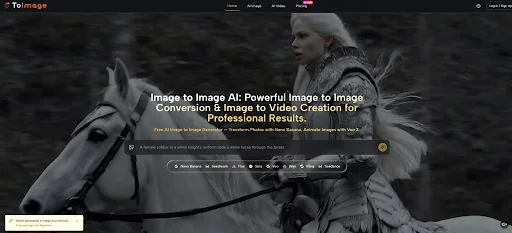
Most discussions about AI image tools focus on output quality. People ask which model looks sharper, which one feels more realistic, or which one produces the most dramatic transformation. Those questions matter, but they miss a larger point. The more important change is workflow design. That is why Image to Image is interesting from a broader creative perspective. It is not just offering one visual engine. It is presenting a workspace where different models can be used for different purposes inside the same general process. That changes the question from “Can AI generate something good?” to “How should different models be used at different stages of visual work?”
That shift may sound subtle, but it affects how creators plan, test, and refine. In older workflows, changing tools often means breaking momentum. One platform is used for rough ideation, another for editing, another for animation, and sometimes another for consistency control. Every switch introduces friction. Every friction point slows decision-making. A multi-model environment matters because it compresses those steps. It lets people compare possibilities without rebuilding the project each time they want a different kind of result.
In my view, this is one of the clearest signs that image generation is maturing. The conversation is moving beyond single-output novelty and toward systems that support actual creative routines.
Why One Model Rarely Solves Every Visual Need
A creator might want speed at the start, precision in the middle, and stronger polish near the end. Those are not identical needs. Treating them as if they can all be handled by one model often leads to frustration.
Exploration And Refinement Are Different Tasks
The earliest phase of creative work usually benefits from speed. You want options, not perfection. Later phases often demand better fidelity, more stable subject treatment, or more intentional editing. A platform that recognizes this difference is usually more practical than one that promises the same behavior for every situation.
Consistency Requires A Different Kind Of Strength
Some projects do not need wild transformation. They need stable identity. A recurring character, a recognizable product, or a brand-specific style often requires reference support and more disciplined interpretation. That is a different problem from fast ideation.
Animation Adds Another Layer Entirely
Once an image becomes the source for motion, the requirements change again. Movement quality, temporal continuity, and cinematic feel become relevant. That is why image-to-video options belong in the broader conversation. The workflow does not stop at stills anymore.
How The Platform Organizes That Variety
Image to Image AI seems built around the idea that users can begin with a source image, define the intended transformation, then choose a model path according to the kind of result they need. That structure is simple on the surface, but it encourages a more strategic way of working.
Step 1. Upload The Image You Want To Build From
Everything starts with the source image. This is important because the platform is not asking users to abandon their existing material. It is asking them to treat that material as a base layer for further development.
Step 2. Describe The Outcome In Plain Language
The prompt acts as the bridge between the source and the new version. It tells the system how to reinterpret what is already there. In practical terms, this means the user does not need to manually reproduce every detail. They define intention and let the model attempt a structured translation.
Step 3. Select The Model That Matches The Goal
The choice of model is part of the creative decision, not a background technical step. A realism-focused task may call for one model. A rapid ideation phase may call for another. More precise edits may depend on a model with stronger contextual behavior.
Step 4. Evaluate Results Across Directions
Once the output appears, the value is not only in receiving an image. It is in seeing how a specific model interpreted the same source and request. That side-by-side comparison can be more educational than any tutorial because it teaches users how different systems respond to the same creative problem.

What Each Model Path Suggests About Workflow Roles
The platform presents several image-related models with distinct positioning. Looking at them as workflow roles rather than isolated features makes the platform easier to understand.
Nano Banana Fits Quality Focused Reference Work
Nano Banana appears most closely tied to higher realism and reference-based control. Support for multiple reference images suggests it is useful when continuity matters. That makes it relevant for creators who are not just generating one interesting image, but building a repeatable visual language.
Reference Images Support Repeatable Identity
This matters for brand work, serialized content, and projects where the subject should remain recognizable across outputs. In my observation, once users care about continuity, reference support becomes less of a bonus and more of a requirement.
Nano Banana 2 Pushes Comparison Further
The platform also presents a next-generation version with higher resolution options and the ability to generate multiple images per request. That combination changes workflow in a practical way. It supports batch comparison, which is often how good creative decisions actually happen.
Resolution And Batch Output Change Review Habits
When creators can generate several options and review them together, they are less likely to overcommit to the first decent result. The process becomes more editorial. Users compare nuance, not just basic success.
Seedream Serves High Velocity Idea Testing
Seedream seems designed for speed and broader experimentation. This is important because idea generation is often limited not by lack of imagination but by slow response cycles. A faster model keeps exploration alive.
Speed Supports Wider Creative Range
When the turnaround is short, users try more prompts, test more moods, and discard weak outputs more freely. That usually leads to stronger final direction, even if the earliest outputs are not the final ones.
Flux Supports Selective Visual Control
Context-aware editing suggests a workflow role closer to revision than invention. This matters because professional image work often depends on partial transformation rather than total replacement.
Selective Editing Feels Closer To Real Production Needs
In many serious workflows, the image is already mostly correct. The need is to revise a section, replace text, adjust an object, or improve one area without disturbing everything else. A model built for that kind of control often feels more useful than one built only for broad restyling.
Why This Matters For Different Types Of Users
The platform is easier to evaluate when viewed through use patterns rather than feature lists. Different users are solving different kinds of visual problems.
| User Type | Likely Priority | Most Useful Capability | Why It Helps |
| Solo creators | Fast experimentation | Speed focused generation | Produces more options with less delay |
| Brand teams | Consistency | Reference supported transformation | Keeps outputs visually aligned |
| Marketers | Scalable visuals | Product and lifestyle variations | Expands campaign material quickly |
| Designers | Selective revision | Context aware editing | Preserves structure while refining details |
| Story driven creators | Motion potential | Image to video pathways | Extends still images into narrative assets |
How This Changes Creative Decision Making
A multi-model platform affects more than execution. It changes how people make choices. Instead of searching for the single best model in theory, users can think in stages.
Early Stage Work Becomes Broader
At the beginning, a faster model may help discover whether the direction should feel cinematic, editorial, painterly, minimal, or highly commercial. That is not the moment to chase perfect texture. It is the moment to find direction.
Middle Stage Work Becomes More Intentional
Once a direction is chosen, a different model may be better for tightening fidelity, preserving identity, or using references to hold the work together. This is where the workflow starts to resemble a real production process rather than random experimentation.
Late Stage Work Benefits From Specificity
Near the end, context-aware editing or more precise control matters more. The user is no longer asking broad questions. They are solving narrower visual problems.
What The Limits Still Look Like
Even in a strong workflow design, limitations remain. That is part of using these systems responsibly.
Prompt Quality Still Sets The Ceiling
No model choice fully compensates for a vague request. Users still need to say what matters, what should remain, and what kind of visual logic they are aiming for.
Source Material Still Influences Output
A better source image generally gives the system a better foundation. Poor composition or unclear subject matter can still weaken the result, even when the model is capable.
Iteration Is Still Part Of The Job
In my experience, the most useful outputs usually come through rounds of adjustment rather than instant perfection. The advantage of a good platform is not that it removes iteration. It makes iteration cheaper and more informative.
Why Multi Model Workflows Matter Now
The larger significance here is not just that many models are available. It is that creative work can now be distributed across them more naturally. A single source image can move through exploration, refinement, comparison, and extension without forcing the user to constantly rebuild context.
The Platform Becomes A Creative Decision Space
That is what makes a multi-model environment more meaningful than a long feature list. It creates a place where choices can evolve. The user does not need to decide everything at once.
The Output Is Only Part Of The Value
The real value is often in what the workflow teaches. By comparing how different models interpret the same source and prompt, users develop sharper instincts about which tools fit which kinds of problems.
The Best Result Is Often Better Process Design
This may be the clearest reason such platforms matter. The strongest outcome is not always the single best image. Sometimes it is a better process for arriving there. A workflow that lets creators test quickly, refine deliberately, and compare intelligently is doing more than generating visuals. It is changing how visual judgment gets exercised in the first place.