For graphic designers, architects, and visual artists, the workflow often begins with the hunt for inspiration. You scour the web for reference images, textures, or stock assets to build a mood board or an internal client mockup. However, you frequently hit a common roadblock: the perfect image is marred by distracting elements—date stamps from a site survey, an intrusive logo on a vendor’s sample, or unwanted text overlays that ruin the aesthetic.
In the past, fixing these images meant spending tedious hours in Photoshop. You would painstakingly use the Clone Stamp or Healing Brush, pixel by pixel, trying to reconstruct a complex background. Often, the result was a blurry smudge that looked obviously “photoshopped,” compromising the professional look of your presentation.
Fortunately, the integration of Artificial Intelligence into the designer’s toolkit has revolutionized this process. Modern tools no longer just “blur” the imperfections; they understand the context of the image.
AI-Powered Restoration for Static Imagery
The primary challenge in image restoration is maintaining the integrity of the texture and lighting. When removing an object, the software must predict what should be behind it.
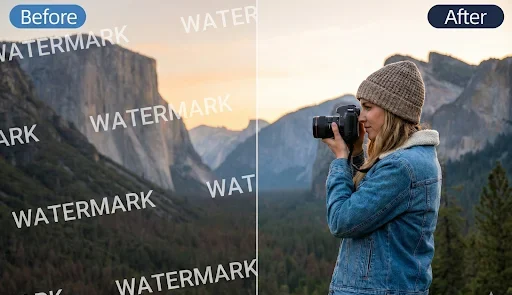
This is where specialized AI tools shine. Instead of manual cloning, an AI-driven Photo Watermark Remover analyzes the surrounding pixels—recognizing patterns like brickwork, foliage, or skin tones—and intelligently fills the gap. For designers working on architectural visualizations or product mockups, this capability is invaluable. It allows you to clean up visual assets for internal presentations instantly, ensuring that your client focuses on the design concept rather than the imperfections of the source material.
Moving Pictures: Handling Video Assets
As the design industry shifts heavily toward motion graphics and short-form video content (Reels, TikTok, and dynamic ads), the need for clean assets has expanded beyond static JPEGs. Designers are often tasked with repurposing video clips, but removing a static overlay from moving footage is notoriously difficult due to the changing perspective and lighting in every frame.
Manual frame-by-frame editing is not feasible for most deadlines. To address this, developers have introduced tools that apply temporal consistency. A robust Video Watermark Remover tracks the unwanted element across the timeline. It ensures that as the camera pans or the lighting shifts, the “in-painted” area blends seamlessly with the video, preventing the jittery or flickering artifacts that often plague low-quality editing attempts.
Streamlining the Creative Workflow
The goal of these tools is not to encourage copyright infringement, but to empower the creative process. Designers often need to clean up their own photography, remove timestamps from construction site documentation, or prepare legitimate stock assets for client approval before purchasing the high-resolution final license.
By automating the cleanup process, you reclaim hours of billable time. Instead of fighting with pixels, you can focus on composition, color, and storytelling. Including these AI-powered solutions in your digital toolkit ensures that your visual presentations remain pristine, professional, and persuasive.