
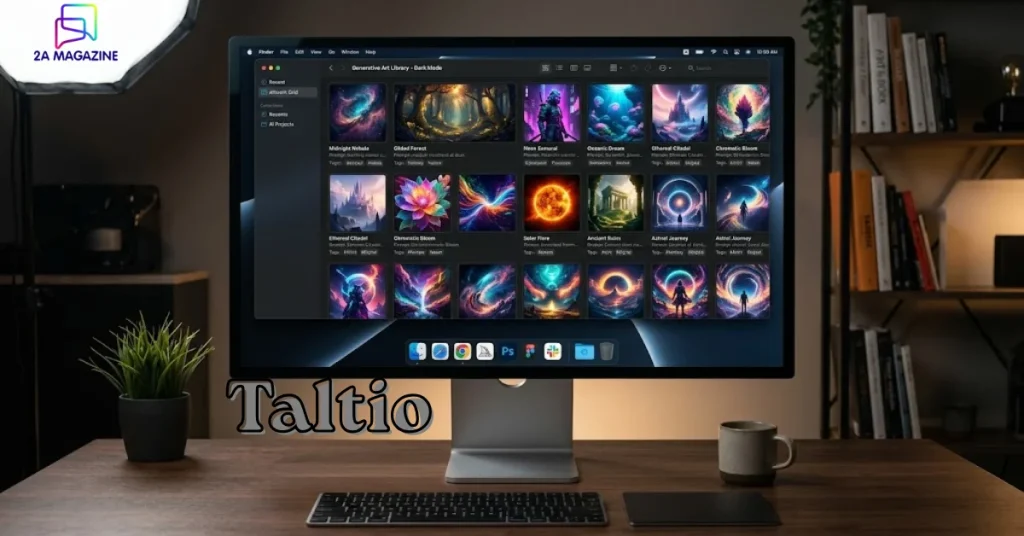
If you’ve ever generated hundreds of AI images and then spent 20 minutes searching for that one image with that exact prompt — you already understand the problem Taltio was built to solve.
AI-generated art has exploded in 2026. Tools like Midjourney, Stable Diffusion, and ComfyUI have made image generation accessible to everyone. But nobody really talks about what happens after you generate the images. The folders get messy. Prompts get lost. You forget which model produced which result. That’s exactly what Taltio targets — it’s a macOS app built specifically for organizing and managing AI-generated artwork.
It’s a niche tool, but for the right user, it’s genuinely brilliant.
What Is Taltio and Who Actually Needs It?
Taltio analyzes your folders of AI-generated images or videos and identifies prompts, models, and generation settings when available. Think of it as a smart librarian for your AI art collection — one that actually understands what’s inside each file, not just the filename.
Who needs this? Honestly, more people than you’d think.
- Digital artists running weekly prompt experiments
- Content creators building AI-assisted visual brands
- Developers testing and comparing model outputs
- Researchers archiving generative AI experiments over time
If you’re casually generating five images a week, you’ll probably manage fine without it. But if AI image generation is part of your actual workflow, Taltio fills a real gap that no generic file manager can.
How Does Taltio Actually Work?

This is where it gets genuinely interesting. Most file organizer apps are dumb — they sort by date, name, or file size. That’s it. Taltio works differently because it reads the metadata embedded inside your AI-generated files.
When generation data is available, Taltio can detect information like prompts and negative prompts, model, sampler, and seed, steps and guidance scale, and the source platform.
So instead of opening a file and trying to remember what you typed, Taltio surfaces all of that automatically. You can then search across your entire collection by any of those attributes — find every image generated with a specific model, or every output that used the same seed value.
That’s not a minor convenience. For anyone doing systematic prompt engineering or model comparisons, it’s the difference between a chaotic hard drive and an actual organized research archive.
The ComfyUI Integration — A Big Deal for Power Users
One feature that’s making Taltio stand out in AI art communities is its ComfyUI integration. Taltio lets you connect to a ComfyUI instance to generate images directly from within the app.
This matters because ComfyUI is one of the most powerful (and most complex) local image generation tools available. It’s beloved by serious AI artists for its flexibility, but its workflow can be scattered. Having Taltio bridge the organization side while ComfyUI handles the generation creates a much cleaner pipeline.
It’s a smart design choice — rather than trying to replace ComfyUI, Taltio wraps around it and makes the whole experience less chaotic.
Organization Without the Headaches
One thing Taltio gets right that many “smart” apps get wrong: it doesn’t disrupt your existing folder structure. You open any folder as a project and your files stay exactly where they are.
This is important. Nobody wants to import their entire hard drive into a proprietary system that locks their files into a new format. Taltio respects where your files already live and layers its organization on top of that structure.
You can add tags, edit metadata, search across prompts, models, or settings instantly, move files into subfolders, and build your own folder structure within projects. Tags let you group work by style, theme, or experiment.
In practice, this feels closer to a photo management app like Lightroom than a traditional file manager. And that’s probably the right comparison — Lightroom didn’t move your RAW files. It just helped you make sense of them. Taltio does the same thing for AI-generated content.
According to productivity researchers studying creative workflows, tools that reduce “search friction” — the time spent hunting for the right asset — can cut creative project overhead by up to 30%. Taltio is squarely aimed at eliminating that friction.
What Platforms and Tools Does Taltio Support?
Taltio works whether you use Stable Diffusion, ComfyUI, Midjourney, or other tools. That’s a broad net, and it’s one of the app’s genuine strengths. A lot of AI artists don’t stick to just one generation platform — they mix and match depending on the task.
The fact that Taltio can parse outputs from different tools and organize them inside a single project view is genuinely useful. You’re not forced to maintain separate folders or apps for each generation platform.
As of 2026, the app is macOS-only, which does limit its audience. Windows users, who make up a large portion of the Stable Diffusion community (especially local model runners), don’t have access yet. That’s probably the biggest current limitation — and a natural expansion opportunity if the developers choose to pursue it.
The Broader Picture: AI Art Needs Better Infrastructure
It’s worth stepping back for a second. The conversation around AI art in 2026 has mostly focused on generation quality — which model is best, which prompt style works, which new feature just dropped. Very little attention has gone to the infrastructure around generation.
But as TechCrunch has noted, the maturation of any creative technology always brings a second wave of tooling — the file managers, the version controllers, the asset libraries — that make the primary tools usable at scale. We saw it with digital photography, with video editing, with 3D modeling.
AI art is hitting that second wave now. Tools like Taltio are part of that shift. They’re not trying to generate anything. They’re trying to make the generation you’ve already done actually findable and useful.
That’s a quieter kind of innovation, but it might end up being just as impactful for working AI artists as the next model update.
Should You Try Taltio?
If you’re a Mac user who generates AI images regularly — yes, it’s worth trying. The app is available on the Mac App Store, which means installation is clean and the update path is managed automatically.
It’s not for everyone. If you’re a casual user with a small collection, it’s probably more app than you need. But if you run experiments, test prompts systematically, or manage a large archive of generated content, Taltio solves a real problem in a clean, thoughtful way.
The fact that it doesn’t touch your files or force a new folder structure is a sign that the developers actually thought about how real creative workflows operate. That kind of respect for existing workflows is rarer than it should be in productivity software.
In 2026, as AI art becomes more embedded in professional creative pipelines, tools like Taltio aren’t a luxury — they’re the infrastructure that makes serious work possible.

FAQs
Q1: What is Taltio used for?
Taltio is a macOS app designed to organize and manage AI-generated images and videos. It reads embedded metadata from your generated files — including prompts, models, seeds, and settings — and makes your collection searchable and structured.
Q2: Which AI image tools does Taltio support?
Taltio supports outputs from Stable Diffusion, ComfyUI, Midjourney, and other AI generation platforms. It can detect generation data from multiple tools within a single project view.
Q3: Does Taltio move or change my files?
No. Taltio opens your existing folders as projects and leaves files exactly where they are. You can add tags and metadata inside Taltio without altering the original files or folder structure.
Q4: Is Taltio available on Windows?
As of 2026, Taltio is a macOS-only app. There’s no official Windows version available yet, which is a notable gap given how many Stable Diffusion users run Windows locally.
Q5: What makes Taltio different from just using Finder or a regular folder system?
Finder can’t read the generation metadata inside AI image files. Taltio can — it lets you search by prompt text, model name, seed value, or tags across your entire collection instantly. That’s a fundamentally different level of searchability.