
BigCommerce powers around 70,000 live online stores globally. Just like other stores, yours also depends on technical structure for Metadata Work in BigCommerce as much as products and pricing.
When these elements work together, your store gains clarity, consistency, and stronger search visibility.
BigCommerce gives you solid default controls, yet many store owners miss some basic details. Below, we have discussed how each element works and how you can use it properly.
How BigCommerce handles URL structure
Overall, BigCommerce generates URLs based on:
- Product names
- Category paths
- And store settings
When you have access to the control panel, you can manage most of this behavior, which will let you make changes without coding.
Above all, clean URLs help search engines understand the intent of a page and help shoppers trust the link.
Many eCommerce business owners don’t have advanced knowledge of search engine optimization. They use professional Bigcommerce SEO services during setup to avoid unexpected costs later.
Default URL Patterns in BigCommerce
Overall, BigCommerce creates readable URLs by default. Product URLs include the product name, and category URLs reflect category hierarchy.
You can edit these paths per product or category without breaking the store:
For Product URLs:
- Log in to BigCommerce Admin
- Go to Products
- Click View under Products
- Select the product you want to edit
- Scroll to the Search Engine Optimization section
- Edit the Product URL field
For Category URLs:
- Log in to BigCommerce Admin
- Go to Products
- Click Product Categories
- Select the category you want to edit
- Scroll to the Search Engine Optimization section
- Edit the Category URL field
One of the best parts is that BigCommerce or Metadata Work in BigCommerce avoids random strings in URLs. This helps search engines find relevance faster and understand the page much better.
Custom URL Editing and Redirects
In Big Commerce, you can edit any product or category URL from the admin panel. It creates automatic 301 redirects when you change a URL (intentionally or accidentally), and that’s one of the best things here.
However, try to avoid frequent URL edits. In this case, stable URLs enhance trust with search engines over time.
Here are some of the best practices for BigCommerce store URLs:
- Keep URLs short and readable
- Use lowercase letters only
- Remove stop words where possible
- And avoid dates, unless it’s about a specific event
Canonical tags and importance in BigCommerce
Canonical tags help search engines identify the main page for similar content. BigCommerce or Metadata Work in BigCommerce adds canonicals automatically, but store owners should review them in specific cases.
In the case of huge eCommerce websites, large websites have lots of content with filters, category paths, or sorting options. Canonicals prevent these variations from competing with each other.
In the case of BigCommerceor Metadata Work in BigCommerce , the system assigns self-referencing canonical tags to products and categories by default. Each product page points to its main URL, even if users access it through multiple category paths.
Common canonical issues in BigCommerce
Some of the most common issues arise with faceted navigation, internal search pages, and pagination. These pages often generate unique URLs that don’t need indexation at all because:
- Filtered URLs are creating crawl waste
- Paginated pages point to page one incorrectly
- Manual canonicals are missing after theme edits
However, you should review canonicals after theme updates or installing apps. In this case, even small changes can override defaults.
Another great SEO feature is that BigCommerce allows you to set a manual canonical on products, landing pages, or cross-listed items. BigCommerce or Metadata Work in BigCommerce allows manual canonical edits through theme files or SEO fields.
Only override when a clear primary page exists. Incorrect canonicals can remove pages from search results.
Metadata in BigCommerce explained
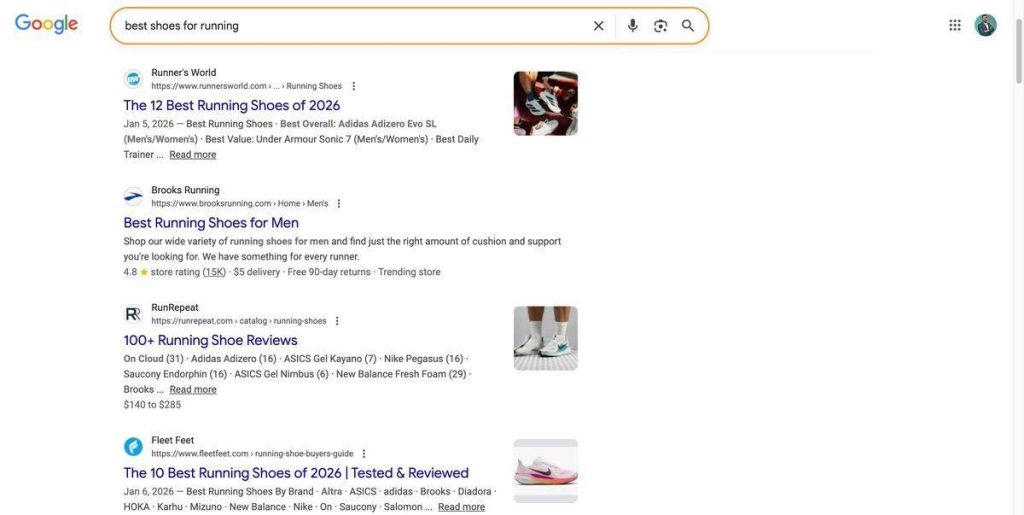
Metadata helps determine how your pages appear in search results. Title tags and meta descriptions enhance the organic performance of an online store.
In fact, Google often rewrites over 60% of title tags. BigCommerce auto-fills titles using product names and categories. As for meta descriptions, BigCommerce or Metadata Work in BigCommerce does not enforce length, yet as you may know, search engines cut long descriptions.
BigCommerce provides metadata fields at several levels.
- Product-level SEO fields
- Category-level SEO fields
- Webpage SEO fields
Pro Tip: According to the best practices, keep meta titles under 60 characters and descriptions within 145-160 characters.
Advanced Tips for Growing Stores
As you may know, the bigger the store, the bigger the risks of mistakes. For example, product variations can create near-duplicate pages. So better to keep one primary product page when possible, and use options instead of duplicates.
One of the problems that pages are being deindexed is canonicals. Paginated category pages often need proper canonical handling; they can be removed from Google SERPs. Luckily, BigCommerce manages this pretty well by default.
Finally, using a detailed schema can be helpful to enhance the organic performance of the website. You can use structured data on the homepage, product pages, and service pages.
Final Thoughts on Long-Term SEO Health
URLs, canonical tags, and metadata are some of the top factors that search engines use to show and rank websites.
In this case, BigCommerce gives you enough flexibility to carefully set up and consistently customize SEO elements.
So if you use SEO-friendly URLs, proper canonicals, and optimized metadata, it will indeed give some boost to your website.
This featured read is stealing attention for all the right reasons at 2A Magazine.