In today’s digital world, we all love posting videos on social media. Platforms like Instagram, YouTube, Facebook, and TikTok prioritise video because it captures attention quickly and drives engagement. However, recording a proper video is very important. What truly separates an average video from a professional and engaging one is editing. Fortunately, you don’t need advanced third-party software or expert-level skills to improve your videos.
There are several simple editing techniques to enhance video quality, viewer retention, and overall impact. This article explains practical methods on how to improve social media videos using simple editing techniques. Let’s get started!
Quick Tips to Improve Social Media Videos
There’s no silver bullet for social media success – you can easily improve your videos using simple methods and third-party video cutters or editors. Here are some quick techniques that can easily help you edit videos for your social media posts:
1: Start with a Clear Objective
Before you initiate video editing, understand the actual objective of your video. Is it educational, promotional, entertaining, or inspirational? Once you know your target audience, you can edit more effectively. For example:
- Educational videos should remove unnecessary pauses and distractions.
- Promotional videos should be fast-paced and attention-grabbing.
- Storytelling videos should maintain emotional flow.
Editing becomes easier when you know your viewers, as it helps you prepare social media videos as per their needs.
2: Edit Video Wisely
One simple way to edit social media videos is by using an online video editor. For editing, you can use professional free online video editor tools like EaseUS Video Editor. This all-in-one video editor software can help you extract audio from video, turn spoken words into text, remove watermarks from your videos, and perform other advanced editing.
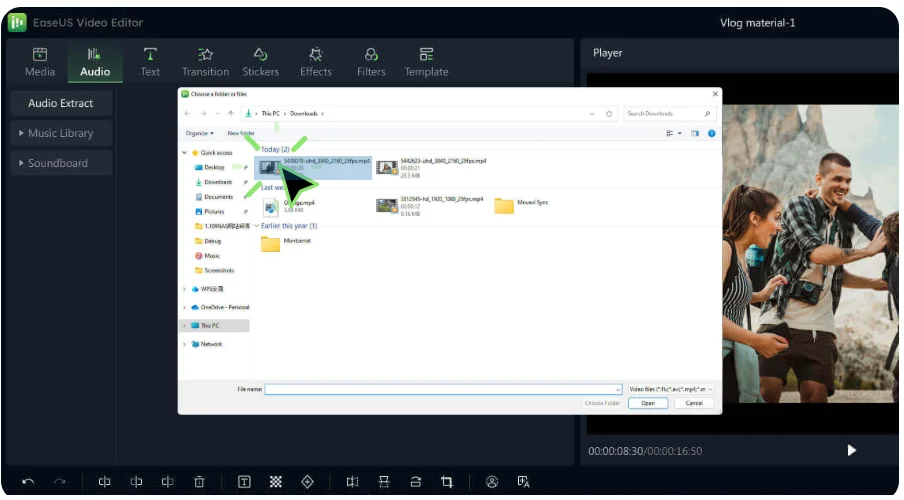
This online video editor is available in a freemium model, i.e., it provides basic editing features for free, while advanced and premium functionalities are available through paid subscription plans.
3: Trim Unnecessary Part
Social media audiences have short attention spans. Long pauses, repeated sentences, and excessive filler can reduce user engagement. To avoid such issues, you can trim your videos or remove long silences and parts which do not add value to them. You can use a free online video cutter such as Stellar Online Video Cutter to trim the unnecessary parts from your social media videos.
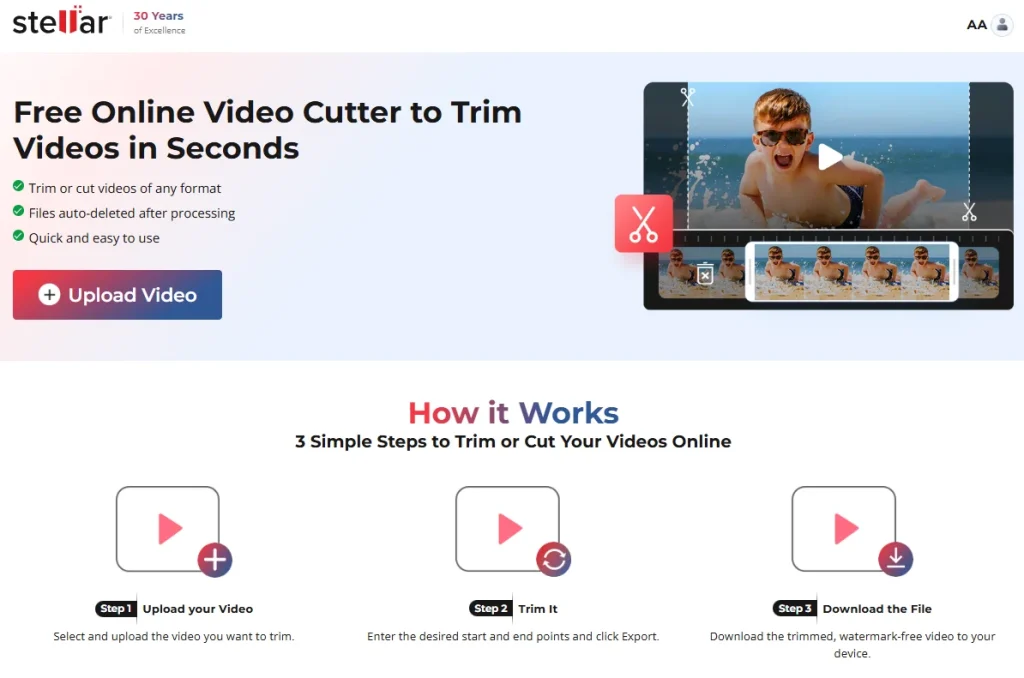
Since Stellar Online Video Cutter is completely web-based, you don’t need to install any third-party software. You can easily repair the video from your web browser. This tool has made video trimming fast, convenient, and beginner-friendly, helping you create clean and polished videos in just a few steps.
4: Improve Audio Quality
Poor audio quality or issues like improper audio-video sync can ruin your video streaming experience. While recording with a good microphone is ideal, editing can still improve sound quality. To enhance audio quality or to improve it in your video, you can use a free online video editor. This tool helps in reducing background noise, adjusting volume levels, and automatically filling empty spaces in your videos.
5: Maintain Authenticity
While editing enhances quality, avoid over-editing that removes personality. Social media audiences prefer authenticity over perfection.
Natural expressions, real emotions, and honest communication build stronger connections than overly polished content.
Additional Tip: Why Choose Free Online Editing Tools?
Free online editing tools have become increasingly popular among content creators, students, marketers, and businesses. There are several features which make these online tools convenient and effective for your social media video editing. These features include:
- No Installation Required: Online tools work directly from your web browser. You do not need to install any third-party software on your computer. This saves storage space and eliminates compatibility issues.
- Ease of Use: Most online editing platforms are designed with a simple and intuitive interface. Their user-friendly interface makes it simple to trim, cut, add text, adjust brightness, and insert music without technical knowledge.
- Accessible from Any Device: Since these tools are web-based, you can access them from any device with an internet connection.
- Perfect for Simple Projects: Not every project requires advanced cinematic editing. For trimming videos, adding captions, creating short promotional clips, or preparing social media posts, free online tools are more than sufficient.
Conclusion
Repairing videos doesn’t require advanced technical skills. Simple techniques like trimming unnecessary parts, adding captions, improving audio, adjusting lighting, and using subtle transitions can significantly enhance quality and engagement. The key is clarity, consistency, and simplicity. You can use free online video editor tools to fix videos directly from your web browser in a few simple clicks. As you practice and experiment with these online editing tools, your videos will naturally become more professional and impactful.
Frequently Asked Questions (FAQs)
Why is editing important for social media videos?
Editing enhances video quality, removes mistakes, improves pacing, and makes content more engaging. Well-edited videos hold viewer attention longer, increase watch time, and improve overall performance on social media platforms.
How can I make social media videos more engaging?
You can improve the video by adding captions to it, using smooth cuts, including background music, and keeping the video short and focused. These small improvements increase viewer retention.
What is the role of audio in social media videos?
Clear audio improves credibility and keeps viewers engaged. Reducing background noise and balancing music volume ensures your message is easily understood.