For years, screen recording was the default method for capturing presentations as video. The workflow was simple: share your screen, start recording, talk through your slides, stop recording, and distribute the file. Tools dedicated to screen capture and recording built entire businesses around this workflow. But as the expectations for video quality have risen and the technology for AI video generation has matured, a fundamental shift is occurring in how organizations think about converting presentations to video.
This article examines the evolution from screen recording to AI-powered presentation video, comparing the two approaches and examining when each makes sense.
The Screen Recording Era
Screen recording tools democratized video creation in a meaningful way. Before screen recording became widely available, creating a video from a presentation required a production setup: cameras, lighting, microphones, and editing software. Screen recording reduced this to a single click. Anyone could record themselves presenting slides and share the result.
The Limitations
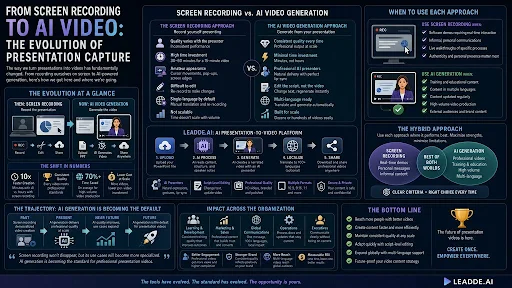
But screen recording has inherent limitations that become apparent as the volume and quality expectations for video content increase. Quality varies with the presenter. Some people are naturally articulate on camera; others stumble, use filler words, or lose their train of thought. Every recording session is a performance, and performance quality is inconsistent. Time investment remains high. A “quick” screen recording of a 15-minute presentation typically requires 30-60 minutes when you factor in preparation, re-recordings, and basic editing. Multiply this by dozens of presentations and the time adds up. The output looks amateur. Screen recordings show cursor movements, notification pop-ups, and the visible edges of the presenter’s screen. Even with post-production cleanup, screen recordings have a distinctly informal quality that may not meet professional standards. Editing is difficult. Making changes to a screen recording means re-recording. If you discover an error at the 12-minute mark of a 15-minute recording, your options are to re-record the entire thing or accept the error.
The AI Video Generation Approach
AI presentation-to-video tools take a fundamentally different approach. Instead of recording a live performance, they generate the video from the presentation content itself. The slides, text, speaker notes, and structure of the PowerPoint file serve as input, and the AI produces a complete narrated video with an AI presenter as output.
The Key Advantages
Consistent quality. Every video produced by the AI maintains the same production quality — consistent narration, professional visual design, and polished output regardless of how many videos are generated or when they are created. Minimal time investment. The conversion process takes minutes rather than the hour or more required for screen recording with re-takes and editing. Editing is at the script level. Changes are made by editing text, not by re-recording video. If a statistic needs updating or a section needs rewording, the change takes minutes and affects only the relevant portion of the video. Professional AI presenters. Instead of the creator appearing on camera (or not appearing at all, leaving the audience watching slides), an AI presenter delivers the content with professional-quality expression, gestures, and lip-sync.
Platforms like Leadde.ai represent the current state of this approach. Upload a PowerPoint file, and the platform generates a narrated video with an AI presenter who delivers the content as if presenting it live — but with consistent quality, professional polish, and the ability to edit at the script level after generation.
When to Use Each Approach
Screen Recording Still Wins For
Software demonstrations where showing the actual interface in use is essential. These require real-time screen interaction that AI generation cannot replicate. Informal, personal communications where authenticity and personal presence matter more than production quality. A CEO recording a quick video message to the team benefits from the imperfect, human quality of a screen recording. Live walkthroughs of specific processes where the exact clicks, menus, and interactions need to be visible.
AI Generation Wins For
Training and educational content where consistent quality and professional presentation improve learning outcomes. Any content that needs to exist in multiple languages, since AI translation produces localized versions automatically. Content that will be updated over time — product presentations, policy overviews, process documentation — where script-level editing is more efficient than re-recording. High-volume production where generating dozens of videos per week would be impractical with screen recording. Content for external audiences where professional production quality matters for brand perception.
The Hybrid Approach
Many organizations are adopting a hybrid strategy that uses each approach where it performs best. Screen recording handles software tutorials, personal messages, and informal content. AI video generation handles formal presentations, training materials, multilingual content, and any high-volume production needs.
This hybrid approach maximizes the strengths of each technology while minimizing their limitations. The key is having clear criteria for when to use each approach, so content creators make the right choice without deliberating.
The Trajectory
The trajectory favors AI generation. As AI presenter quality improves and as organizations need more video content at higher quality levels, the use cases where screen recording is the better choice will narrow. Screen recording will likely remain valuable for the specific scenarios where real-time screen interaction is essential, but for the broad category of “converting presentations to professional video,” AI generation is becoming the default approach.
Organizations that have invested in screen recording workflows are not facing an either-or decision. AI video generation complements existing capabilities by handling the use cases that screen recording handles poorly — high-volume production, multilingual content, consistent quality at scale — while screen recording continues to serve its original strengths.