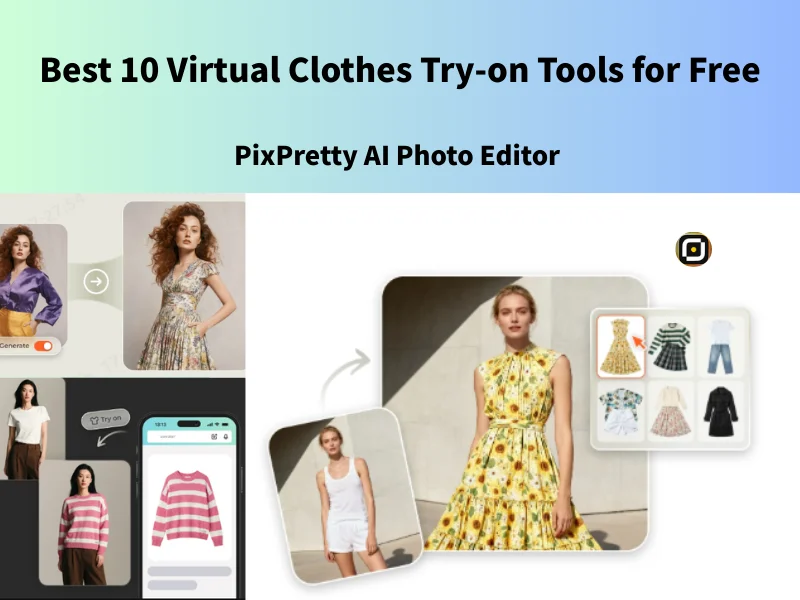
Is buying clothes online always a gamble—adding items to your cart, waiting for delivery, only to find they don’t fit, don’t look right, or aren’t what you imagined? AI-powered clothes changers are revolutionizing your fashion experience. In this article, we will test the best 10 AI cloth changers on the market and provide honest results for your reference PixPretty AI Photo Editor.
How AI Clothes Changers Work?
AI clothes changers use advanced machine-learning models to analyze body shape, pose, and lighting in a photo. The system then overlays or generates new clothing that matches the image’s textures, folds, and shadows, creating a natural, realistic appearance.
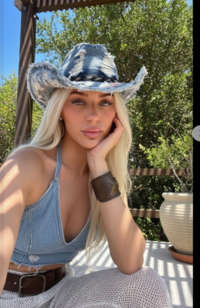
AI Clothes Changer Photos I used to test
Transforming the outfit in this image into a black dress involves several technical challenges for most AI clothes-changing or virtual try-on systems. The complexity comes from both the pose and the visual environment.
1. Occlusion on the torso and waist
2. Unclear body contours
3. Overlapping elements (arm blocking the clothing area)
10 Free AI Virtual Clothes Changers With Real Details
1. Gemini AI Clothes Changer
Google’s Gemini excels in photorealistic rendering, especially for fabric colors and natural lighting. It performs very well for portrait-style photos.
User Experience of Gemini AI Clothes Changer: Gemini’s text-to-clothing conversion function is powerful and well-suited to selfies and portraits. Still, its generation speed is slower than ChatGPT or PixPretty, so it may be time-consuming if you need to batch-edit PixPretty AI Photo Editor.
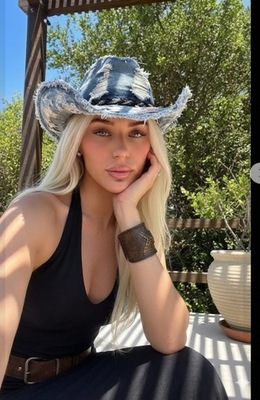
Best For Users who want polished outfit changes for portraits.
Unlock a related post filled with guidance to help you move forward with clarity.
2. PixPretty AI Clothes Changer (Best Overall)
PixPretty AI Clothes Changer is the best virtual clothes try-on tool, which can provide over 100 looks from consistently delivers the most realistic, high-resolution, and commercial-ready outfit changes. Its clothes changer handles complex poses, lighting, long hair, and fabric textures better than most competitors of PixPretty AI Photo Editor.
User Experience of PixPretty AI Clothes Changer: I uploaded a photo and selected a black dress from the PixPretty catalog. I can also customize how I take off my hat and other accessories. The effect presented the most realistic fabric wrinkles and shadows, and what impressed me most was the excellent pose-holding function. The processing speed was fast (3-5 seconds), and the operation was very simple.

Pros: PixPretty AI Clothes Changer is simple, requiring no complex prompts, and it preserves details and movements, with well-done facial expressions that look very natural. The lighting on the subject was natural, and it even helped fix my makeup, which surprised and delighted me.

Style: Best for those who appreciate a sophisticated or casual style PixPretty AI Photo Editor.
How to change your look with PixPretty AI Clothes Changer?
Step1. Upload your image to PixPretty AI Clothes Changer
Step2. Choose the look you want or upload the clothes you want to try on
Step3. Wait for seconds and free download the generated image.
3. ChatGPT AI Clothing Generator
ChatGPT’s vision models allow text-based clothing changes, generating entirely new outfits from a user’s photo. ChatGPTz primarily generates creative clothing designs using text prompts. If you provide very specific prompts, it can still help you introduce various clothing styles. However, it’s not specifically designed for fashion and doesn’t have a pre-defined fashion catalog, so sometimes the output can be inconsistent.
User Experience of ChatGPT AI Clothes Changer: It’s not easy to use ChatGPT to change the photo clothes. I just wanted to try on a black form, but after entering the suggested words three times, I still couldn’t get the image I wanted PixPretty AI Photo Editor.
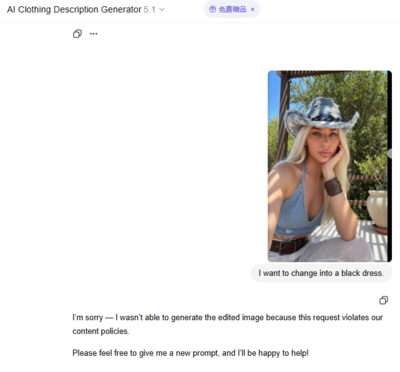
4. DeepSeek AI Image Generator
Deepseek AI image generator uses AI scene recognition to suggest and virtually overlay outfits appropriate for the environment in the image.
Features: Intelligent outfit changing, scene-aware matching.
Advantages: Provides context-aware style suggestions.
5. Canvas AI Clothes Changer
Canva’s Magic Edit tool allows users to upload a model photo and a photo of the clothing they want to try on, enabling AI-powered virtual try-on effects. However, this feature is not free.
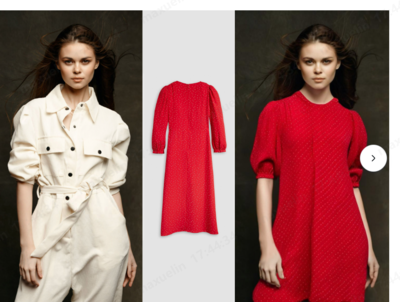
Best for Canvas Advanced users and social media creators.
Freemium AI Virtual Clothes Changers with
6.YouCam AI Clothes Changer
YouCam AI Clothes Changer is designed for real-time AI segmentation and AR overlay to change outfits on selfies or videos.
Features: Real-time virtual try-on, selfie outfit change.
Advantages: Excellent mobile experience, supports AR try-on.
7.MyEdit AI
Myeditr AI clothes changer leverages generative AI to replace or modify clothes in uploaded images while maintaining realistic textures.
Features: Custom outfit changes, multiple style generation.
Advantages: Ideal for fashion bloggers and content creators.
8. Airbrush AI clothes changer
AirBrush AI Clothes Changer is an AI-powered photo editing feature that lets you upload a photo and automatically replace or swap outfits with new styles at PixPretty AI Photo Editor. If you’re a free user, there are relatively few outfits available here, and it can only be used 3 times a day. I chose a vest from the catalog, and the generated effect is quite natural.

Best for Fast, easy one-click outfit swap with minimal setup.
9.DressX
Utilizes Dress X AI to digitally fit clothing onto photos and videos, creating realistic virtual fashion without physical garments.
Features: Generates virtual outfits, try-on with uploaded photos.
Advantages: Focused on digital fashion, ideal for social media content.
10. Clothify AI
Clothify AI detects clothing areas and applies generative models to change styles, colors, or add new designs.
Features: AI outfit change, style transformation.
Advantages: Supports multiple styles, easy to operate.
FAQ: Everything About AI Clothes Changer Technology
1. What is an AI Clothes Changer?
An AI Clothes Changer is a technology that uses generative models to replace, modify, or create clothing directly on a person’s image. It can turn any outfit into a new style—dress, suit, streetwear, seasonal looks—without needing physical garments or reshoots.
2. Is AI outfit-changing safe?
Yes, reputable tools like PixPretty secure user photos with encryption and delete them automatically.
3. Which AI clothes changer is best?
PixPretty AI Clothes changer ranks among the best for realism, speed, and ease of use.
Conclusion: The Road Ahead for Virtual Fashion
AI clothes changers open exciting possibilities for personalization and brand innovation. PixPretty AI Clothes Changer stands out as a top solution for both individual creators and enterprise fashion platforms, offering reliability, realism, and unmatched speed. As AI fashion evolves, one thing is clear: Virtual try-on is no longer the future; it’s the present.
Explore more stories that help you learn faster and make smarter choices.