Global music publishing in 2026 demands more than bright backgrounds and viral trends alone. Artists and labels now prioritize stability, timing accuracy, and clear controls for lyrics on screen. Reliable platforms reduce delays during syncing, styling, revision cycles, and final delivery worldwide AI Lyric Video Generator.
Consistent visual standards across regions also matter as songs travel between platforms. Budgets remain under pressure, so subscriptions and upgrade paths influence long-term planning. This ranking reviews each lyric video maker using practical performance measures.
Part 1. Lyric Video Generator Features: What Makes a Good Tool
Modern music workflows need tools that balance timing accuracy, visual clarity, and stable performance. These features keep lyric video generator projects consistent and reliable:
- Beat-Accurate Syncing: The tool should support precise timing adjustments on every lyric change. Lyrics must track musical rhythm during fast, complex, or shifting sections.
- Stable Rendering Engine: Export should finish with long tracks and heavy visual layers. Crashes, freezes, and corrupt files must remain rare during extended editing sessions.
- Bulk Text Handling: The editor manages full song lyrics without slowing project navigation. Clear grouping helps separate verses, hooks, and bridges during layout and revision.
- Layer-aware Effects: Visual tools should apply motion, glow, or blur across text layers. Consistent behavior is important when managing repeated hooks or multilingual lyric segments.
- Flexible Aspect Control: The project should switch between vertical, square, and widescreen formats. Platforms with different feed layouts require quick adjustment without rebuilding entire edits.
- Audio-reactive Options: Visual elements should respond to volume peaks and transitions. Reliable reaction helps maintain impact across choruses, breakdowns, and instrumental sections.
Part 2. Top Lyric Video Maker Tools: Best AI Generators Ranked
With criteria in place, the ranking focuses on stable performance in real publishing conditions. This lyric video maker list is evaluated for creative control, learning curve, and long-term value:
1. Wondershare Filmora
This software ranks for users who want structured tools for lyric-based music projects. Filmora combines timeline editing with AI transcription that can reduce some manual timing steps. Its detection features can identify vocal lines and generate on-screen text from recorded speech.
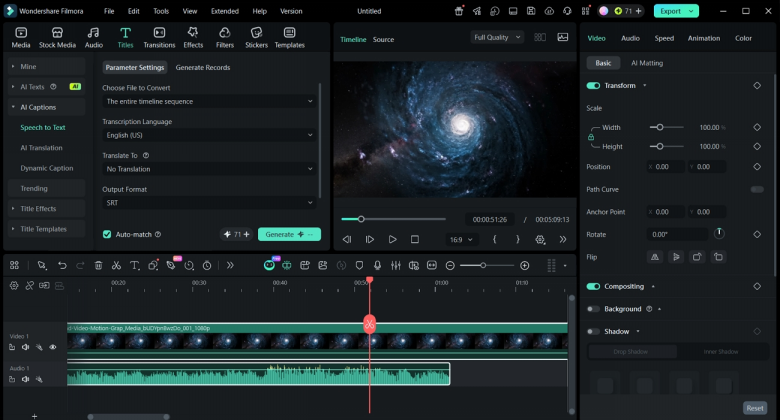
Animated presets help apply basic movement and style to lyrics without building effects from scratch. Built-in music visualizers add movement linked to audio levels, beats, and frequency changes. The layout and templates are oriented toward musicians and content creators who need repeatable workflows.
Pros
- Template structure helps new editors keep similar projects organized.
- Desktop layout supports longer sessions when handling full-length tracks.
- Users can build multi-track projects that include lyrics, overlays, and backgrounds.
Con
- Some advanced features and asset options are unlocked under specific paid plans.
Cost
| Plan | Price |
| Monthly | $9.99/month |
| Yearly | $24.99/year |
| Perpetual | $39.99 |
2. CapCut Desktop
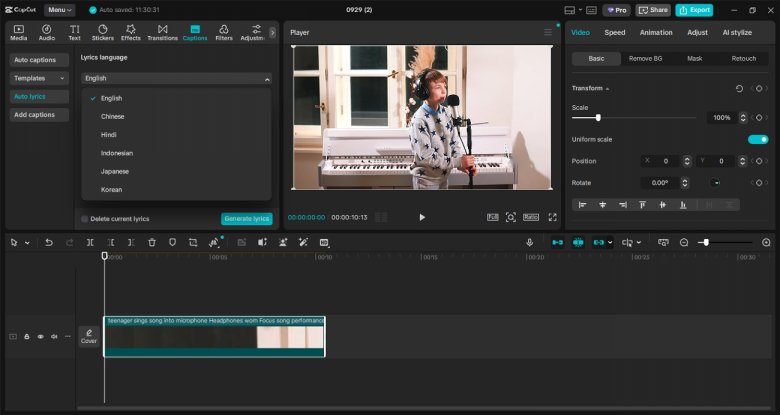
CapCut is designed for users who work with short music content and captions. The software connects editing tools with platform-focused export settings for social publishing workflows. Built-in options help prepare music clips that match current feed and story formats. Some users also test lyric video generator AI workflows inside broader content schedules.
Pros
- Export presets reduce setup steps before uploading to major platforms.
- Project files help adjust clips when release timing or formats change.
Cons
- Certain advanced features appear first on mobile before the desktop release.
- Longer songs with many cuts can increase project management tasks.
Cost
| Plan | Price |
| Free Plan | $0 |
| Pro Monthly | Approx. $19.99/month |
| Pro Yearly | Approx. $179.99/year |
3. Adobe After Effects
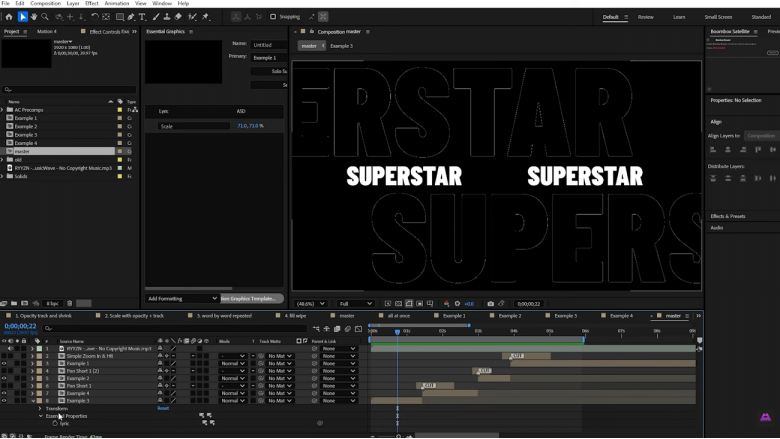
It appears in workflows where lyric timing and motion need close control. Many teams place it after other tools to refine text placement and animation structure. Text layers, audio waveforms, and keyframes support detailed timing across long or complex songs. Some lyric projects also link After Effects with templates or scripts from external sources.
Pros
- Integration with other Adobe tools streamlines media preparation and final delivery.
- Users can build lyric layouts that follow detailed timing across segments.
Cons
- Subscription plans can add an ongoing cost for smaller or irregular projects.
- New users may need time to understand panels and layer organization.
Cost
| Plans | Price |
| Free Trial | $0 |
| After Effects | $9.19/month + VAT |
| Creative Cloud Pro – All Apps | $33.99/month + VAT |
4. Lyric Video Studio
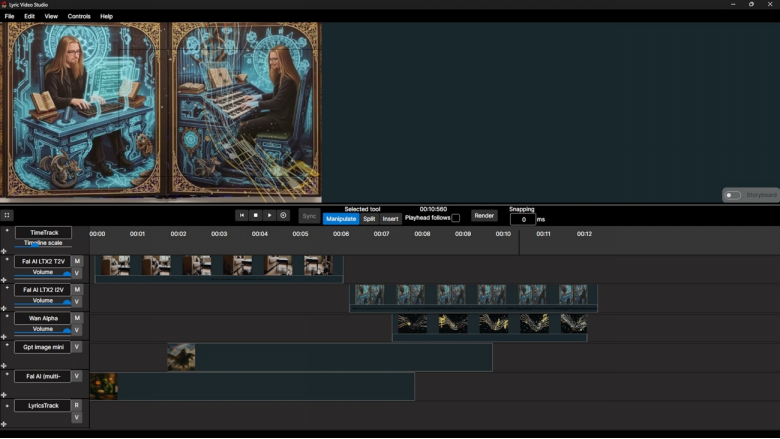
Lyric video creator that ranks for users who focus on structured lyric timelines and audio links. Tools in this software connect lyric tracks, visual layers, and music playback on one timeline. Sync controls allow word-level timing changes during playback and later review sessions. Background options include audio-reactive visuals that respond to changes in the music signal.
Pros
- Word-by-word sync tools support detailed timing changes during editing passes.
- Project structure supports repeat use when similar lyric formats appear.
Cons
- Export settings still need checks to match platform requirements for releases.
- Certain features may require reading help material before regular use.
Cost
| Plan | Price |
| Free Version | $0 |
| Full Version | Starting from $54 |
5. Adobe Premiere Pro
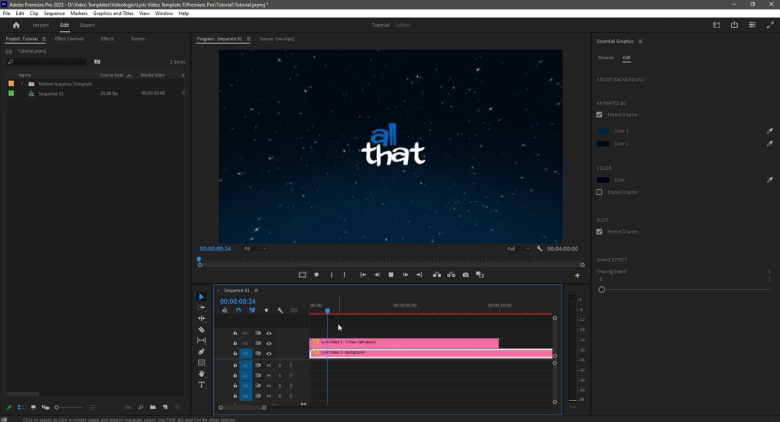
Projects with multiple contributors often rely on timelines that handle music, dialogue, and visual layers together. Adobe Premiere Pro organizes these elements in one place for editors who manage complex song releases. Sequence tools allow cuts, overlays, and text blocks to move in line with project needs. Integration with other software supports workflows where lyric versions sit beside other video deliverables.
Pros
- Caption tools support lyrics alongside other on-screen information when required.
- Timeline markers help teams note changes for different versions and releases.
Cons
- New users may spend time learning the interface and terminology.
- Certain workflows may need extra setup before collaboration features operate.
Cost
| Plan | Price |
| Free Tier | $0 |
| Full App Cost | $22.99/month |
Comparing All Tools
Separate reviews show how every lyric video generator fit into different music release workflows. This comparison highlights platform fit, strengths, use cases, and limits for different options:
| Tool | Best Fit Projects | Learning Effort | Main Strengths | Main Limits | Cost Position |
| Wondershare Filmora | Song-based videos, channel uploads | Moderate | Structured timeline, presets, basic AI support | Detailed animation may need extra steps | Mid-range, subscriptions |
| CapCut Desktop | Short clips, social platforms | Low–moderate | Social formats, quick exports, simple overlays | Longer tracks can feel less convenient | Free tier, paid plans |
| Adobe After Effects | Visual-heavy lyric concepts | High | Layer control, custom motion, plugin ecosystem | Time investment for setup and revisions | Higher subscription |
| Lyric Video Studio | Dedicated lyric video tasks | Moderate | Song-focused tools, lyric organization options | Narrow focus compared with full editors | Varies by edition |
| Adobe Premiere Pro | Mixed video plus lyric content | High | Multi-track editing, captions, integration paths | Extra planning for performance | Higher subscription |
The comparison underlines how the listed tools occupy different roles in lyric production. Filmora, CapCut Desktop, After Effects, Lyric Video Studio, and Premiere Pro serve separate workflow patterns, from short-form posts to longer releases. Matching a tool to any project depends on timeline pressure, team structure, and required control over visuals.
Part 3. How to Make a Lyric Video in Filmora Step by Step
Tight music schedules often need clear steps that reduce repeat work during editing. The following process outlines how to make a lyric video using structured tools in Filmora:
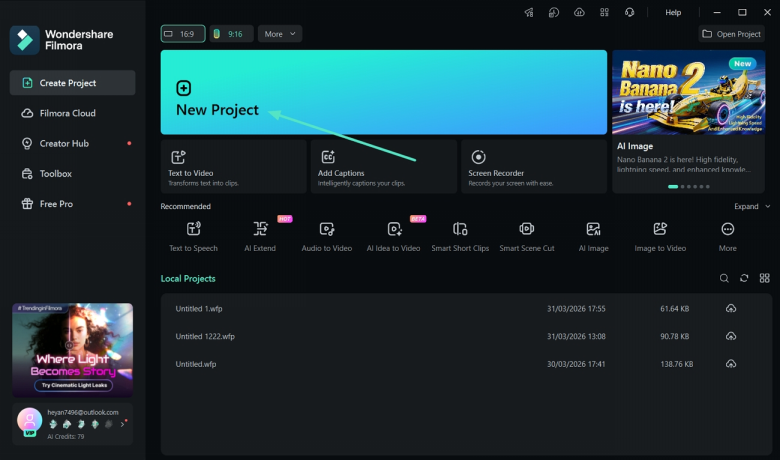
Step 1. Create a New Project
On the main interface, click the “New Project” option to start a new project. Import the audio file by clicking the “Import” button.
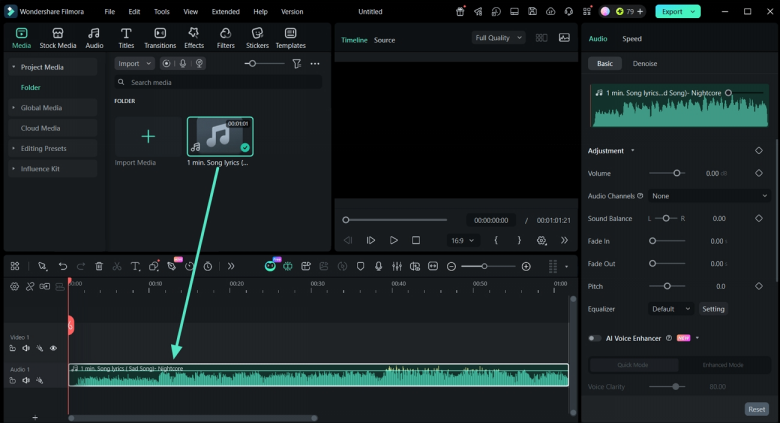
Step 2. Place Audio File onto Timeline
Afterward, drag the audio from the Media Library section and drop it onto the “Timeline”. Place it correctly.
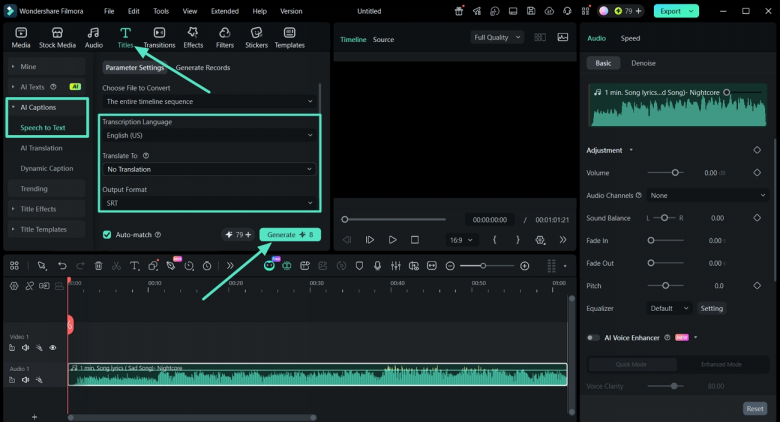
Step 3. Generate Text From Speech
Next, press the “Tiles” option from the top bar and press the “AI Captions” option to expand it. Choose the “Speech to Text” option. Afterward, select the “Transcription Language” option and choose the “Output Format”. Once done, click the “Generate” button.
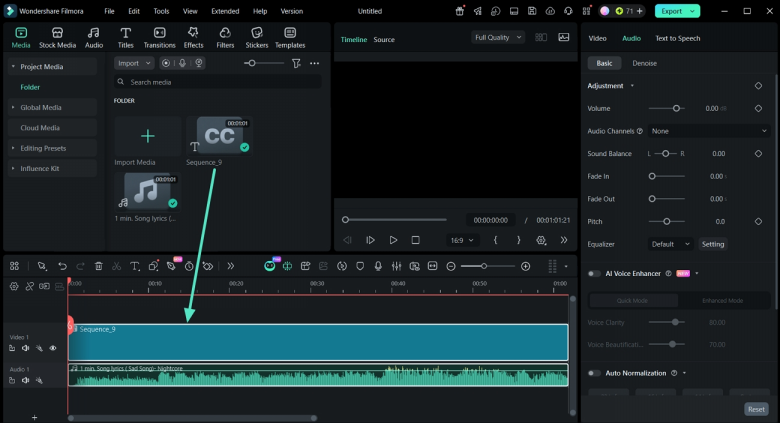
Step 4. Move Generated Sequence to Timeline
Once the sequence is generated and shown in the Media Library, review the lyrics and place it onto the timeline. Make sure that it is aligned with the audio track placed on the Timeline.
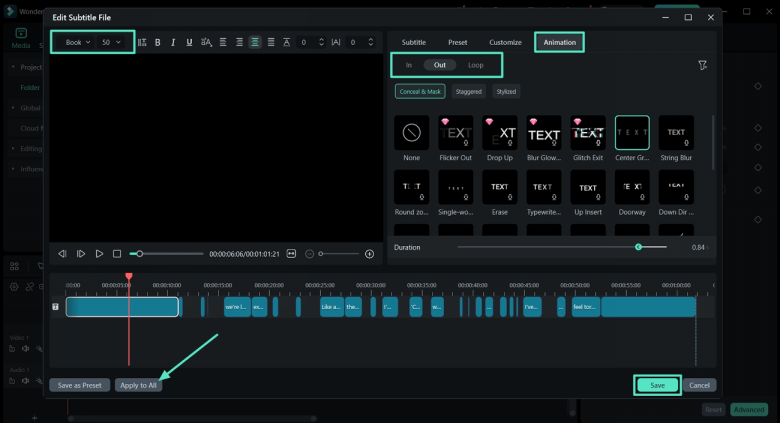
Step 5. Customize the Sequence
Next, double-click the sequence to view its customization controls. Select any sequence and adjustts it size, font, and position on the video. Next, click the “Animation” tab and add “Fade in” and “Fade out” animations. Once done, click the “Apply to All” button and press the “Save” option.
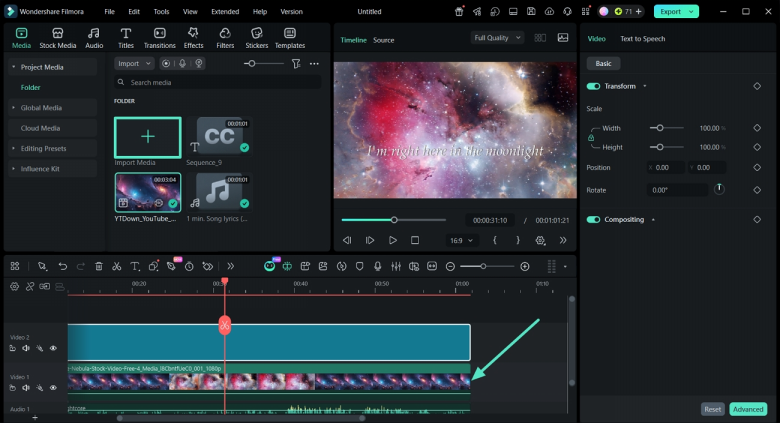
Step 6. Add Video Background
After that, use the “Import Media” option to import a video or image for the background. Move it onto the Timeline and align it with the audio length.
Step 7. Export The Final Video
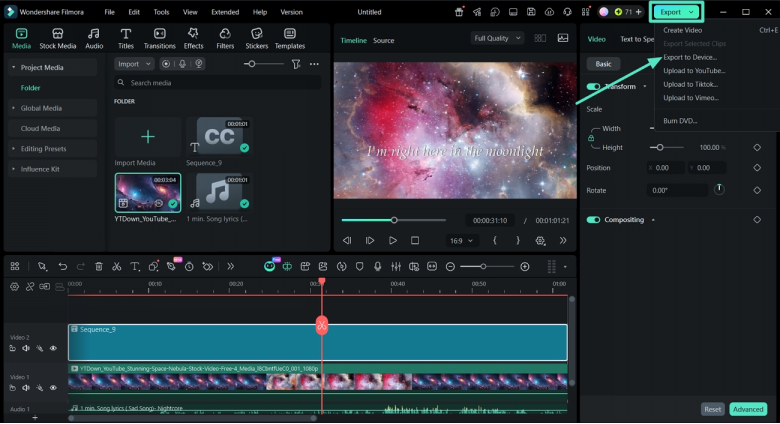
After the video is done, play the video in the “Preview” panel. If the video is finalized, press the “Export” button in the top right corner and click the “Export to Device” option to save it.
Conclusion
To summarize, the article reviews how different AI tools now support structured lyric workflows. Filmora appears as one option among several, alongside other video editors for PC platforms and dedicated lyric video maker services that fit varied release plans. Final choice depends on required control over timing, collaboration needs, and the budget available for ongoing subscriptions.
Note to the Reader: This section reflects independent analysis based on publicly available product details globally. The views expressed here do not represent any official stance from companies or broadcasters.