In the thriving world of custom DIY and personalized merchandise, the bridge between a digital concept and a physical product is often where the most frustration occurs. For hobbyists and small business owners specializing in laser engraving—whether it is customizing leather phone cases, etching metal lighters, or engraving intricate wooden boards—typography is the soul of the product. However, there is a recurring nightmare in the maker community: the “Pixelated Edge.” You find a beautiful, dark, and complex font online, but when you import it into your engraving software, the lines are blurry, the curves are jagged, and the laser fails to execute a clean cut. To overcome this technical hurdle, a professional-grade gothic font generator is no longer just a luxury; it is a critical piece of the production workflow.
The Maker’s Pain: Why Standard Fonts Fail in Physical Production
Laser engraving and vinyl cutting require extreme precision. Every “serif,” “terminal,” and “flourish” of a font is translated into a series of coordinates for a laser head or a blade. Traditional gothic fonts, characterized by their dense strokes and intricate decorative elements, are notoriously difficult to replicate in a physical medium if the source file is low-quality.
Most DIY enthusiasts rely on generic online text converters. The problem is that these tools often output “raster” images—pixels that lose their integrity the moment you scale them up to fit a laptop skin or a piece of wall art. When the laser attempts to follow these fuzzy edges, the result is “charring” or inconsistent depth, effectively ruining the raw material. For a professional maker, this isn’t just a loss of time; it’s a loss of profit. They need a tool that provides high-definition, high-contrast typography that mimics the expressive, handwritten touch of a medieval scribe while maintaining the sharp clarity required for industrial-grade machinery.
The Precision Advantage of a Gothic Font Generator
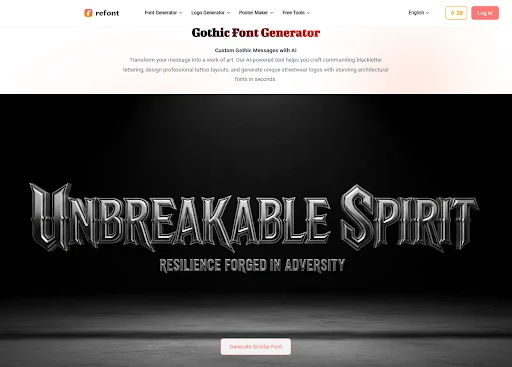
The shift toward AI-powered design tools has revolutionized the “Maker Movement.” A modern gothic font generator does more than just display a font; it creates a clean, high-resolution visual asset. For those working with materials like wood, leather, or stainless steel, the “cleanliness” of the font’s path is everything.
When you use a professional gothic font generator, the output is optimized for high-expressive performance. These tools are designed to handle the complexities of Blackletter and Fraktur styles, ensuring that even the thinnest “hairline” strokes are rendered with enough definition to be recognized by engraving software like LightBurn or Cricut Design Space. This level of detail allows makers to offer products that look “hand-etched” rather than “factory-printed,” satisfying the growing consumer demand for artisanal, unique items.
Matching the Gothic Aesthetic to the Material
Gothic typography carries a weight of history and rebellion, but its effectiveness depends on the material it is engraved upon. Understanding how to match the “style” to the “substance” is a hallmark of professional Expertise and Experience (E-E-A-T).
- Leather Goods (Wallets, Belts, Phone Cases): Leather absorbs detail well but can bleed if the lines are too close together. Use a generator to select a “Modern Gothic” style—one with slightly wider spacing between the vertical strokes to ensure the leather doesn’t “bridge” or tear during the engraving process.
- Metal Etching (Lighters, Flasks, Jewelry): Metal allows for incredible precision. This is where you can push a gothic font generator to its limits, choosing highly ornate, “Old English” signatures with intricate flourishes. The laser can trace these fine lines into the steel, creating a high-contrast look that feels like a family heirloom.
- Wooden Signage and Home Decor: Wood has a grain that can interfere with small text. For wooden items, a “Heavy Blackletter” style is best. The thicker strokes provide enough surface area for the laser to create a deep, dark char that stands out against the natural wood grain.
The “Handwritten” Factor: Personalization in 2026
In the current market, “generic” is out. Customers want products that feel personal. This is why the “Signature” and “Handwritten” capabilities of a font generator are so valuable. Imagine a customer wanting a personalized “Gothic Signature” engraved on a custom guitar pick or a journal cover.
Standard fonts look like they were typed on a keyboard. A generator that simulates the “press” and “flick” of a calligraphy pen provides a level of authenticity that cannot be faked. It gives the physical object a “soul.” This is the “Experience” part of E-E-A-T in action; you are providing a product that shows a deep understanding of traditional craftsmanship, even though you are using 21st-century AI technology to create it.
Technical Workflow: From Generator to Laser
To ensure a perfect result every time, professional makers follow a specific technical pipeline. Here is how to integrate a gothic font generator into your DIY workflow:
- Step 1: Style Selection. Type your text into the generator and filter for “Gothic” or “Medieval” styles. Look for a balance between “complexity” and “line-clarity” based on your material.
- Step 2: High-Resolution Export. Always generate the text at the highest possible resolution. High-contrast (Black text on a White background) is essential for engraving software to accurately “trace” the path.
- Step 3: Vectorization. Import your high-resolution image into a vector program (like Inkscape or Illustrator). Because the generator provided a clean source, the “Auto-Trace” function will result in smooth paths without “noise” or stray nodes.
- Step 4: Focal Adjustment. Before engraving, ensure your laser is perfectly focused. Even the best font will look blurry if the laser beam is too wide.
Building Brand Authority in the DIY Niche
If you are running a business selling these items on platforms like Etsy or Shopify, your visual branding needs to be as sharp as your products. Using unique, generated typography in your product photography and logo creates a sense of “Authoritativeness.”
Google and other search engines prioritize brands that demonstrate a unique “voice.” If your product photos feature custom-generated gothic text that users haven’t seen on every other “dropshipping” site, your engagement rates will naturally climb. This social proof signals to search engines that your site is a trusted source of original, high-quality merchandise.
The Future of “Phygital” Design
We are entering an era of “Phygital” design—where the digital and physical worlds become indistinguishable. The ability to take an AI-generated gothic script and turn it into a physical piece of art is a superpower for the modern creator. It allows for a level of customization that was previously reserved for master calligraphers who spent decades honing their craft.
Today, the barrier to entry is lower, but the ceiling for quality is higher. By utilizing a gothic font generator, you are not taking a shortcut; you are using a precision instrument to ensure that your creative vision is translated into the physical world without compromise.
Conclusion: Crafting the Future of Custom Goods
The DIY community thrives on the “wow factor.” There is nothing quite like the feeling of seeing a laser head trace a complex, beautiful gothic word into a piece of raw material and watching the smoke rise. It is a moment of pure creation.
By choosing the right tools, you ensure that this moment is never ruined by poor resolution or “muddy” typography. Let your designs be sharp, your edges be clean, and your products be unforgettable. Whether you are a hobbyist making gifts for friends or a professional builder creating a legacy brand, the power of high-definition typography is now at your fingertips. Embrace the dark, intricate beauty of the gothic style and bring it into the physical world with the clarity it deserves. Your work is a reflection of your standards—make sure those standards are razor-sharp.