There is no denying of the fact that Outlook OST is a crucial data file. It is a heavily encrypted and secured file. This data file is also known as an Offline Storage Table (OST). It is created automatically when the user sets Outlook to “Cached Exchange Mode.” It facilitates the user to access email messages and other mailbox data even when he is not connected to the internet. Due to this feature, this data file is also known as the “Offline” folder. It is attached to the Outlook profile. It is also server dependent. Ever wonder what happens when your Outlook OST file cannot be opened. It means you are no longer receiving new email messages Convert OST to PST. This scenario means you are going to miss vital meetings. You are also not capable of even sending new emails. Every user is aware if the fact that OST files are tied to specific MAPI profiles. These files (.ost) become inaccessible the moment Outlook refuses to launch.
The only way to overcome this situation and to reclaim your valuable data is to convert OST into a more flexible, portable format like PST. The latter (.pst file) can be easily moved, shared, or imported into different devices. This post will also tell you when to employ a dedicated converter for OST for a stress-free data recovery. But such tools need installation. This condition may be a concern for users who prefer data safety and disallow the usage of third-party apps. The best option for them is to convert OST to PST online. The last option has multiple benefits.
Understanding the Error:
In this part of the post, we will explore common causes of this error. Some of them are listed below:
- A Damaged Data File (.ost): It is one of the leading causes of “Outlook OST file cannot be opened,” error. This issue can arise owing to power failure. Other causes include abrupt shutdown. It may be caused by an unstable network.
- Server Sync Issues: Errors while the OST is syncing with the exchange server is not good. It can make the file inaccessible, leading to this error.
- An Oversized Data File (.ost): With time, the data accumulates. When it hits the maximum (50 GB in Outlook 2010 and later), this issue arises.
- Software Issues: Another third-party application like an antivirus software can lock the .ost file during real-time scanning. It can lead to this issue.
- Corrupt Profile: Any misconfiguration in the Outlook profile can prevent loading the OST file.
- Incompatible Add-ins: Faulty plugins can prevent Outlook from accessing the data file.
Consequences of the Error:
An “Outlook OST file cannot be opened” error typically results in the following consequences:
- Users are unable to access, create, or manage email messages
- Users cannot access contacts stored in the offline file
- Outlook may fail to launch
- Frequent application crashes
- Synchronization failures
- Inability to work offline
Resolving the Error:
This section outlines the solutions available to resolve the error. Follow the guide below to get started:
Method 1: Employing the Import/Export Wizard (When the Outlook is Available):
It will work only if Outlook is working properly. It will not work without Outlook. The user first needs to access the application. He must use credentials of the same Exchange account that was used to create the OST files. Follow the below steps:
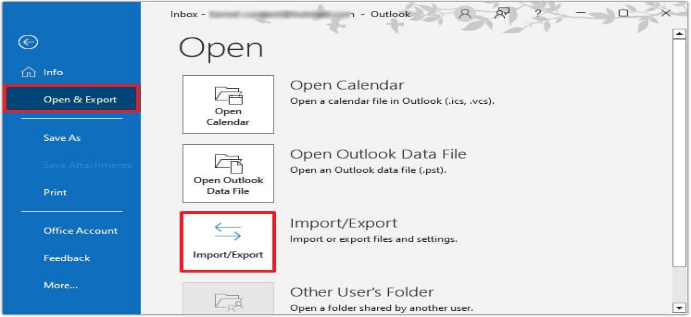
- Browse Files
- Then go to Open & Export
- After this select Import & Export
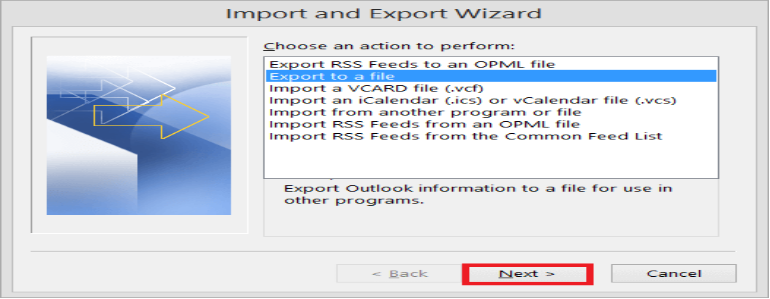
- The onscreen prompt will ask for selecting the action. Choose “Export to a file” option
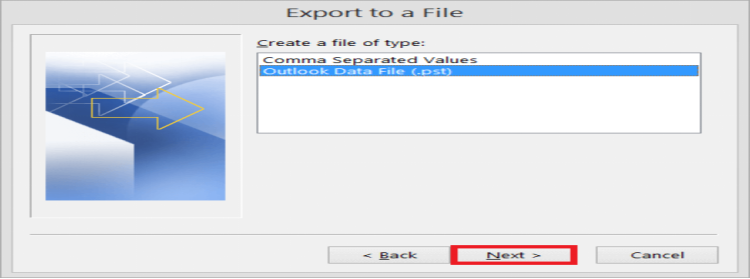
- It is the time to choose file format. Choose Outlook Data File (.pst) option
- After this select “Next”
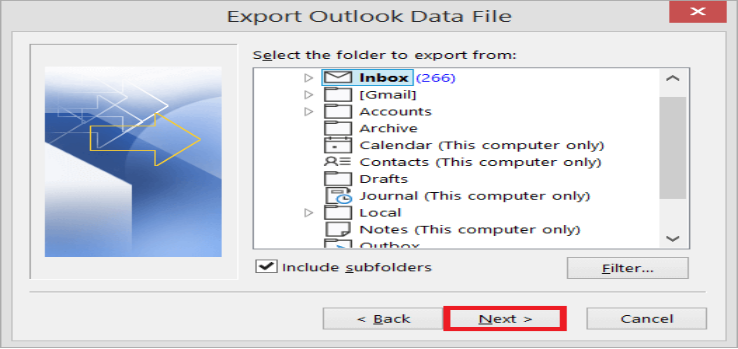
- A dialogue box asking foe folders that need to be exported. Choose such folders. Select subfolders as well. Press Next.
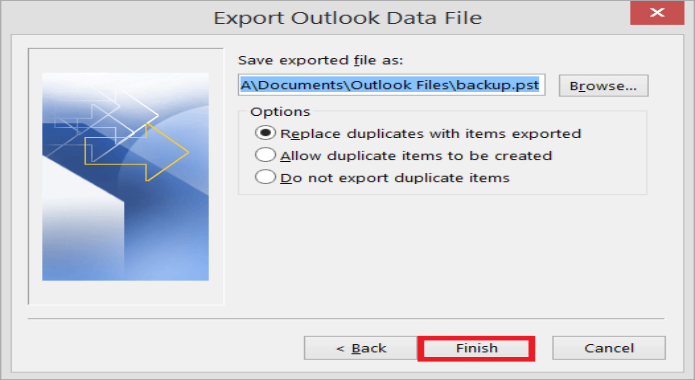
- Browse the location where you need to save the new PST files. Also choose “Replace …. Exported” option. Hit on “Finish”
Method 2: Utilizing Specialized Converter Software: Many users query “How to Convert OST to PST When Outlook Won’t Open”? Their concern is right. Let’s understand when manual functionalities work. A user can utilize manual methods only when Outlook is functioning properly. They will work only in case of a healthy, working Outlook profile. In case the application is not available, such functionality won’t work. Such a situation demands something extraordinary. A user needs to employ some advanced converter software. Such specialized software like Stellar Converter for OST doesn’t require Outlook installation. Such tools are also not dependent on the Exchange server. Their advanced algorithm can bypass the need for Outlook and Exchange Server. But this software comes with a cost. It also needs installation. These factors may not impress users who are extra cautious for their data safety.
Method 3: Convert OST to PST Online: As discussed earlier, multiple users are concerned about data safety. They don’t want to install any third-party software. For them, the best way is to utilize free OST converter tool. They offer multiple benefits. Online OST converter offers a perfect mix of convenience and portability. It is also cost-effective and doesn’t require any installation. Online OST converter also works without Outlook or Exchange configuration. The policy of no data retention for users is extremely commendable. Ideal for non-tech users, these online converters retain the original folder structure.
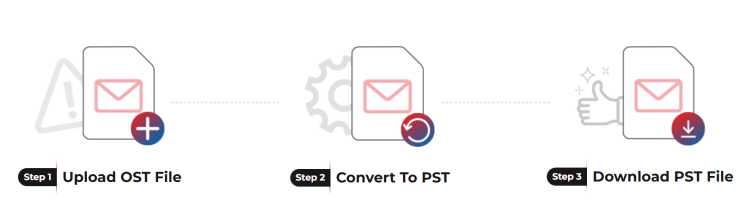
How Online OST Converter Works?
Benefits of Online OST Converter:
- No platform dependence as the conversion happens in a web browser
- No need of installing converter software
- No Outlook dependency
- Doesn’t require an active Exchange profile
- Cost effective method
- Perfect for non-technical users
Conclusion:
The post sheds light on manual method (Import/Export Wizard). We have also learned that manual methods are dependent on Outlook. It also requires an active Exchange profile. In their absence, manual methods won’t work. To overcome such a scenario, the user can use any best OST to PST converter tool. But it requires software installation. Plus, this professional tool comes with a cost. It also requires installation. It is not perfect for users who don’t want to install any third-party software for data safety. The best solution for them is to convert OST to PST online. It doesn’t require any installation. It works without Microsoft Outlook. Online converter doesn’t require an active Exchange Server connectivity too. The process is so easy. Just upload, convert and download the working PST. It is also capable of exporting file to different file formats.
Keep learning with handpicked content for you at 2A Magazine.